How to Build Regression Test Datasets for AI Agents From Production Failures
The highest-value regression test dataset for an AI agent is not handcrafted. It comes from production failures. Every time an agent does something wrong in front of a real user, it hands you a test case you could not have invented: an authentic edge case, a real input distribution, and a concrete definition of what "broken" looks like for your system.
The pattern is a loop. A production failure becomes a trace, the trace becomes a test case, the test case joins a golden dataset, and the golden dataset becomes a release gate in your CI/CD pipeline. Run it on every prompt change, model swap, retrieval tweak, or tool update, and the same failure can never silently ship twice.
Agents make this harder than traditional software for three reasons. They are non-deterministic, so an agent that passes a test today can fail the same case tomorrow. They operate over multi-step trajectories, so failures hide in tool calls, retrieval, and planning rather than just the final output. And the production input space is far larger than any synthetic test set can cover. This is the core of the Agent Development Flywheel in Arthur's Agent Development Lifecycle (ADLC): observe real behavior, turn failures into evals, improve, and lock the fix in place so it stays fixed.
This post walks through how to build that dataset, step by step.
Why Production Failures Are the Best Source of Regression Tests
Synthetic prompts reflect what an engineer imagined a user might do. Production failures reflect what users actually did. That difference is everything when your goal is catching regressions that matter.
Unit tests help, but they are not sufficient for probabilistic, multi-step agents. A handwritten suite covers the cases you already thought of, while production surfaces the long tail of ambiguous phrasings, malformed inputs, and tool sequences you never anticipated. A regression dataset built from real incidents catches the failures your customers will actually hit.
The artifact you are building is a golden dataset: a curated, versioned set of high-signal cases that grows over time. It starts small, expands with every meaningful incident, and gradually becomes the accumulated knowledge of how your agent should behave. Treat it as production infrastructure, not a one-off file.
Step 1: Capture the Full Execution Trace
When an agent fails, do not just log the final error or the final response. Capture the entire trajectory that led there. For an agent, a complete trace includes:
- The user request and full conversation history
- System prompts and the active prompt version
- Tool calls, with their inputs, outputs, and latency
- RAG retrieval results: which documents were pulled, and which were not
- Intermediate reasoning state and key decision points
- The final response
- Application metadata: session ID, user ID, model version, timestamp
Many agent failures happen in the execution path, not the final output. An agent confidently produces a wrong answer because it selected the wrong tool, passed a malformed argument, or retrieved bad context. If you only store the input and output, that root cause is invisible.
This is why the semantic conventions of your tracing matter. Arthur is built on the OpenInference standard, which was designed specifically for LLM and agent workloads. Compared with the OTEL GenAI conventions, OpenInference captures richer LLM call detail (full prompts, completions, tokens, cost, model parameters) and first-class retrieval and re-ranking spans, with explicit span types for LLM, TOOL, AGENT, CHAIN, and RETRIEVER. That depth is exactly what makes a trace replayable as a test case later.
This step ties directly to Part 1 of our best practices series: the teams that instrument early are the ones that ship with confidence. You cannot build a regression dataset from failures you never captured.
Step 2: Classify the Failure Mode
A pile of unlabeled failures is hard to act on. Tag each incident with one primary failure mode so you can cluster similar issues, prioritize fixes, and keep your dataset balanced across real weaknesses rather than dominated by happy paths.
A practical agent failure taxonomy:
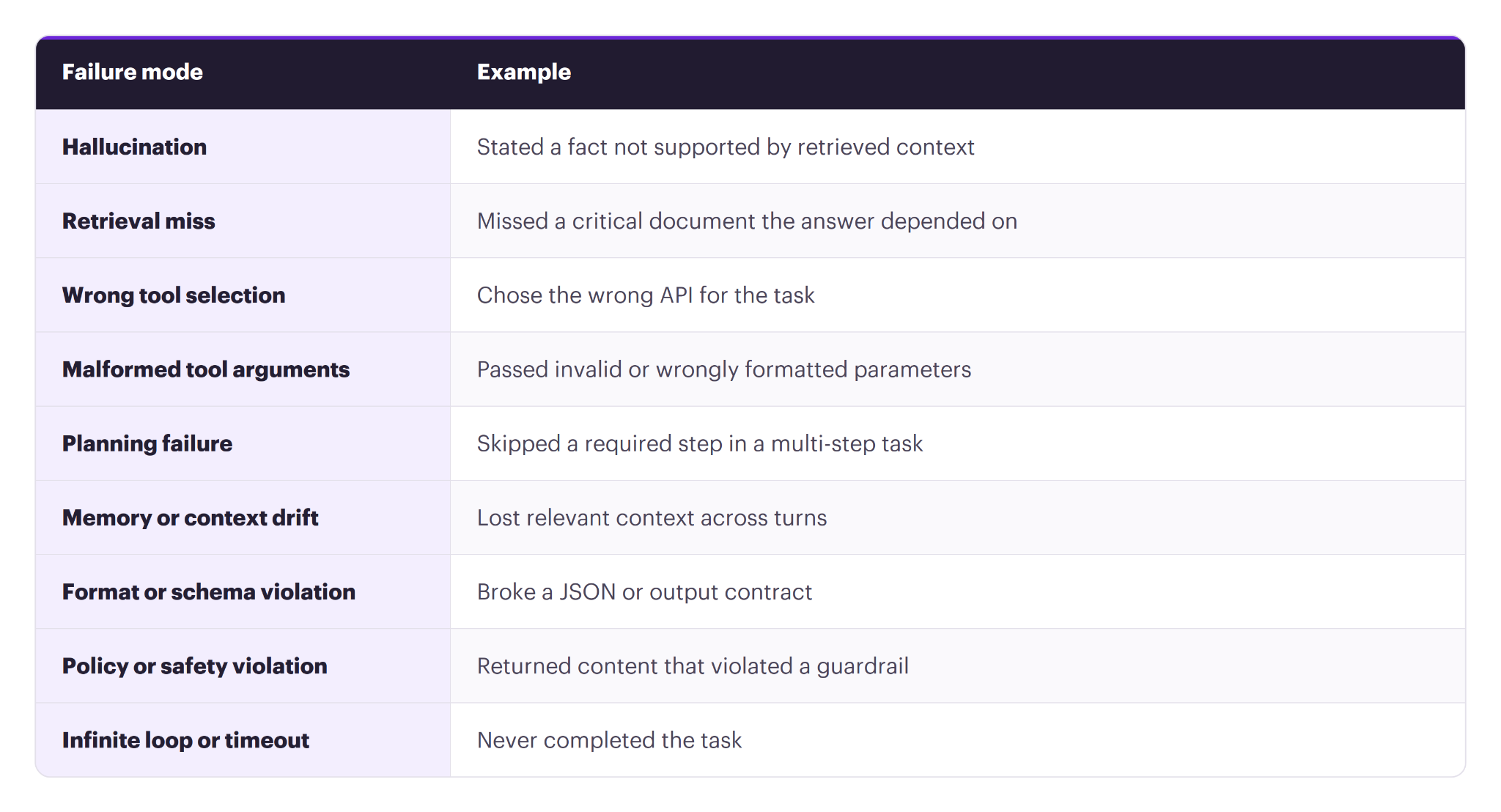
Many teams find that most production incidents are system-level failures (tool use, retrieval, orchestration) rather than pure model mistakes. A clear taxonomy makes that pattern visible and tells you where to invest.
Step 3: Sanitize and Anonymize
Production logs are full of sensitive information. Before a trace becomes a permanent test case, pass it through a sanitation step:
- Strip or swap PII: names, emails, account numbers, medical or financial data
- Remove credentials, API keys, and secrets
- Abstract live database IDs and server URLs into deterministic placeholders or mocks
- Capture any external state the failure depended on, so you can mock it during testing
Where data is too sensitive to retain, rewrite the case into a synthetic equivalent that preserves the failure pattern without the original content. If an agent booked "Portland, Maine" when a user clearly meant Oregon, you do not need the real customer record. You need a test asserting that the agent asks a clarifying question when a destination is ambiguous.
Arthur's pre-LLM guardrails for PII detection and redaction can run in this path as well, which means the same controls that protect production data can help keep your test data clean.
Step 4: Define Expected Behavior and Assertions
Because agents are non-deterministic, exact string matching on the final output is the wrong tool. The same correct answer can be phrased a dozen ways. Instead, assert on behavior:
- Was the correct tool called, with valid arguments, in the right order?
- Were the required facts present and grounded in retrieved context?
- Were forbidden actions absent?
- Did the agent complete the task or ask the right clarifying question?
- Did the output conform to the expected schema?
When you have a known-correct answer from the incident review, you can run supervised evals: checks that compare the agent's output against a ground truth. This is the complement to the unsupervised evals that run continuously in production. Supervised evals unlock a wider range of checks, including SQL semantic equivalence (does the generated query return the same results as the expected one?), tool-sequence matching, and factual correctness against an expected answer.
Whether supervised or unsupervised, the same best practices apply:
- Make evals binary. Score pass/fail, not a 1-to-10 range. LLMs are inconsistent scorers, and a range pushes the judgment call back onto a human. When an eval fires, it should mean something requires attention.
- Make evals specific. Each eval targets one concrete failure mode with a single-sentence definition. "Did the agent reference information not present in the retrieved documents?" is checkable. "Was the response good?" is not.
- Provide examples in the prompt. Anchor the judge with passing and failing examples, focused on the boundary cases where it might otherwise be inconsistent.
- Use deterministic checks where they fit. For schema validation, exact tool-call verification, or numeric range checks, a simple function or validator is cheaper and more reliable than an LLM-as-a-judge. Reserve model-based grading for judgments that need it, like grounding and tone.
- Choose the right model for cost. Evals run often. A smaller model with a well-crafted prompt frequently matches a larger one at a fraction of the cost.
Step 5: Structure, Cluster, and Version the Dataset
Consolidate each case into a consistent schema so the suite stays machine-runnable and easy to filter. A useful test-case structure includes the input and context, the expected behavior, the failure mode, severity, and metadata tying it back to the original incident, prompt version, model, and agent version:
id: TC-142
source: production_incident
incident_id: INC-482
failure_mode: wrong_tool_selection
severity: high
agent_version: 2.3.1
input:
user_message: "Refund transaction tx_99211 and email the user."
conversation_history: []
expected_behavior:
required_tool_sequence: [refund_transaction, send_email_notification]
must_not: ["I'm sorry, I cannot look up that transaction"]
grader: tool_sequence_check + llm_judge
If you add every failure blindly, the suite becomes bloated, slow, and expensive. Cluster incoming failures (vector embeddings work well) and keep one or two high-signal representatives per cluster. If 50 users trip the same edge case, you do not need 50 tests for it.
Version the dataset like source code, alongside your agent, prompt, and model versions. Versioned datasets let you pinpoint exactly when a regression was introduced and compare behavior across releases. Keep your evaluation data strictly separate from any data used to fine-tune the underlying models to avoid leakage.
Start narrow. A strong first pass is 20 to 50 high-signal cases drawn from your highest-impact incidents and core user journeys, then expand weekly as production reveals new failure modes. Aim for balanced coverage across failure modes, not a suite dominated by happy paths.
Step 6: Run Experiments and Gate CI/CD
A regression dataset is only useful if it runs automatically. This is where experiments come in. An experiment combines three things: a dataset, a set of evals, and a variable you are changing (a prompt version, a retrieval config, a model, a tool definition). The dataset and evals stay fixed so you can isolate the impact of the change.
Test at the right level of isolation:
- Prompt experiments run a prompt against your dataset of known inputs and expected outputs. The fastest loop, ideal for prompt tuning. With externally managed, templated prompts, you can swap a version and re-run without touching the agent.
- RAG experiments test whether retrieval returns the right context for known queries. This catches the silent failures where bad context produces confidently wrong answers.
- Agent experiments run the full agent end-to-end and evaluate both the final output and the intermediate traces. The most expensive level, but the closest to production reality.
The general guidance: start narrow with prompt and RAG experiments to find the fix, then validate end-to-end with an agent experiment before promoting.
Then wire the suite into your release process as a gate. Run the regression dataset on every pull request that changes prompts, logic, retrieval, or models. The goal is not a perfect score on every run. The goal is that the updated agent still passes every previously-fixed case without breaking existing functionality. If a change reintroduces a failure you already fixed, the build fails before it reaches a user.
Closing the Loop With the Agent Development Flywheel
Each step here is one turn of a flywheel. Observability gives you traces. Continuous evals surface failures from those traces in production. Experiments turn those failures into improvements. And the dataset you build along the way becomes a growing regression suite that doubles as the accumulated knowledge of how your agent should behave.
One team we work with runs exactly this loop: they monitor continuous eval failures to find where the agent underperforms, add those cases to a behavior dataset with the correct expected output, iterate on the relevant component until the cases pass, and promote the change only when the experiment shows improvement without regressions. The same dataset that drove the improvement now serves as the regression test that protects it. Over time, that dataset becomes a comprehensive record of every way the agent has ever broken, and every way it should never break again.
How Arthur Helps
Arthur's Agent Development Toolkit, built on Arthur Engine, covers this entire workflow in one place:
- OpenInference-native tracing that captures the full trajectory, including tool calls and retrieval, so failures are replayable as test cases.
- Supervised and unsupervised evals that are binary, specific, and explanation-backed, with support for deterministic checks and LLM-as-a-judge.
- Multi-level experiments across prompt, RAG, and full agent, so you can isolate changes and validate before promoting.
- Prompt management with versioning, environment tags, and templating, so you can iterate without redeploying.
- Guardrails for PII redaction and more, which help keep both production and test data clean.
- Governance views that surface an agent's tools, models, data sources, and owner for enterprise review.
If you are building agents headed for production, the fastest way to stop repeating past failures is to turn them into a living regression dataset. Book a demo with an AI expert or explore the Agent Development Toolkit to see it in action.
SHARE


