Best Practices for Building Agents | Part 2: Prompt Management
Welcome to the second installment of our multi-part series on building reliable AI agents. This series distills lessons from our Forward Deployed Engineering team, based on real-world deployments of production agents across industries. If you missed Part 1 on observability and tracing, you can read it here.
In this post, we focus on the second major factor in production readiness, prompt management.
Why Prompts Break in Production
Most teams start by embedding prompts directly in application code. That works for demos. It breaks at scale.
Here’s what we consistently see in the field:
- Untracked changes: Small edits silently alter behavior, with no clear history of what changed or why.
- Coupled deploy cycles: Updating a prompt requires a full application redeploy, slowing iteration and discouraging improvements.
- Environment drift: Dev, staging, and prod prompts diverge with no clean promotion path or rollback.
- No isolated testing: Integrated prompts cannot be tested independently. To evaluate a prompt change, teams must run the entire agent stack, making iteration slow, expensive, and manual.
When prompts determine agent behavior, treating them like hardcoded strings introduces unnecessary operational risk.
What Mature Prompt Management Requires
Through our Forward Deployed Engineering engagements at Arthur, we’ve seen a consistent pattern: teams that treat prompts as first-class artifacts ship faster and with fewer regressions.
Here’s what that requires.
1. External Prompt Storage
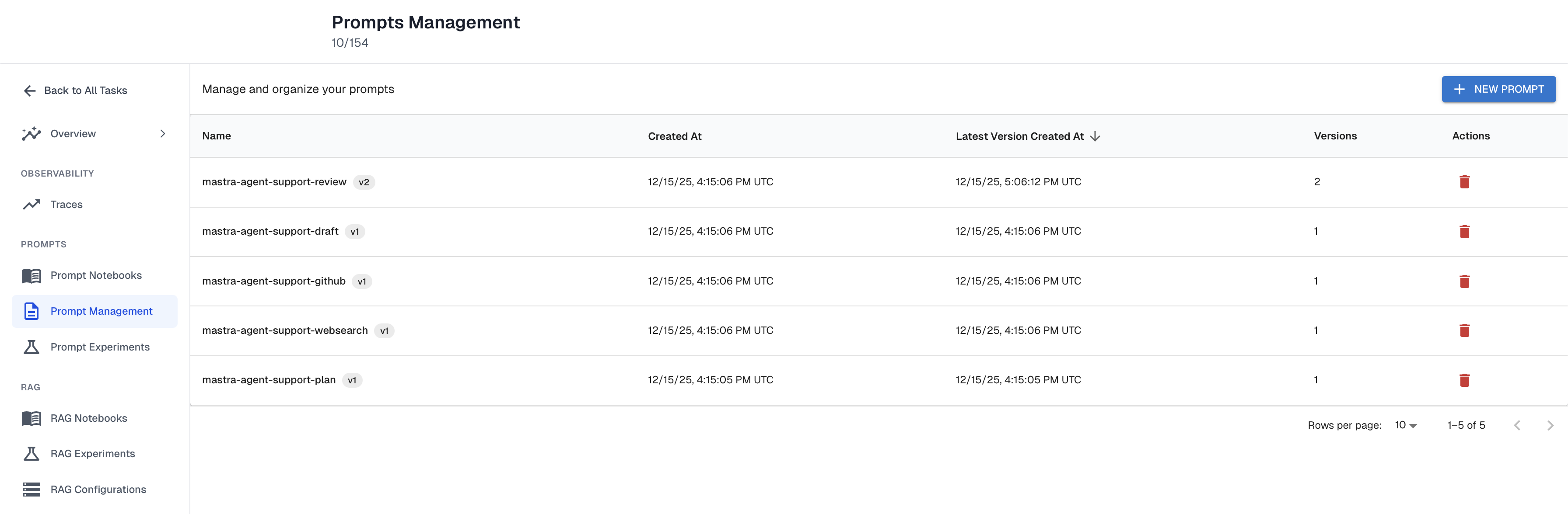
Prompts should live outside your application code.
This separates behavioral iteration from application release cycles. Teams can refine prompts without modifying the core agent runtime, which enables faster iteration and consistent control across environments. Incremental improvements no longer require full engineering deployments. It also broadens who can contribute to agent improvement: product managers and customer success teams can safely adjust prompts through a management UI, instead of relying entirely on engineering resources.
2. Versioning and Rollback
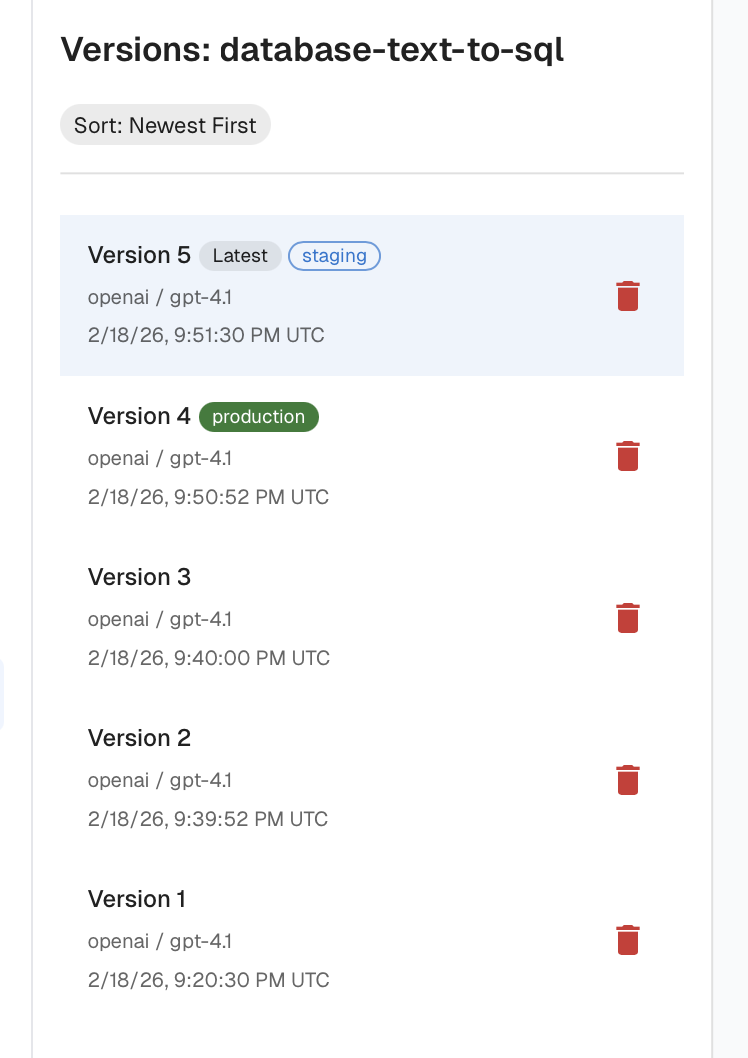
Every prompt should have:
- Explicit versions
- Clear change history
- Environment tagging (dev, staging, prod)
Tagging lets teams develop and validate new prompt versions in isolation, promote them to production without modifying the codebase, and quickly roll back if performance declines. Without versioning and tagging, the risk of regressions makes teams hesitant to experiment, slowing improvement and discouraging iteration.
3. Prompt Templating
Static prompts do not scale to production agents. The naive solution is to include instructions for every database, tool, edge case, and customer configuration in a single massive prompt. That bloats context, increases cost and latency, and can degrade model performance as token counts grow.
A mature templating system supports variables and conditional logic so prompts can be dynamically assembled based on user context, available tools, and data sources. Templating keeps prompts small but comprehensive.
For example, one customer building a SQL-generating agent supports dozens of database types. Instead of embedding instructions for every SQL dialect into one monolithic prompt, they dynamically include only the instructions relevant to the customer’s database. The result:
- Smaller prompts
- More precise SQL generation (less bloat for the LLM to wade through)
- Easier expansion to new dialects
- Lower cost per request
Templating turned what would have been an unmanageable static prompt into a scalable system.

4. Experimentation and Regression Testing
Prompt changes should never be pushed to production blindly.
With proper observability (as discussed in Part 1), teams can build datasets from real customer interactions and replay them against new prompt versions.
This enables two critical workflows:
- Regression testing: Replay historical inputs against a new prompt version or model to ensure behavior doesn’t degrade.
- Failure case improvement: Add known failures to the dataset and iterate until the prompt consistently passes them.
An example of this involved the same SQL-generation agent. As their customer base grew, the prompt began failing for new database types. By isolating the prompt and replaying real customer questions against revised versions, they were able to improve performance on existing data and safely expand support to new SQL dialects before promoting changes to production.
To make this sustainable, they instrumented their prompt templating steps as spans in their traces. That gave them a structured history of how prompts were constructed and how the model responded, which now serves as the foundation for ongoing regression testing.

TLDR
- Prompts are operational logic.
- Hardcoding them introduces regressions, slows iteration, and increases debugging overhead.
- Production-grade prompt management requires:
- External storage
- Versioning and rollback
- Templating
- Experimentation with regression testing
- Combined with strong observability, prompt management turns agent development from guesswork into controlled engineering.
Up Next
In the next post in this series, we’ll explore continuous evaluations and how to automatically detect regressions in agent behavior before your customers do.
Interested in building production-ready agents? Connect with me on LinkedIn.
If you'd like to learn more about shipping reliable agents using these best practices, book a demo with an AI expert.
Want to learn how to put prompt management into practice? Check out our how-to guide on adding prompt versioning and management to your AI agents here.
Want to see how we've applied these best practices internally? Check out our agent building stories: How We Turned a Vibe-Coded Jira Bot Into a Reliable Agent in Two Weeks & What "Building an Agent" Actually Means (And Why Most People Get It Wrong).
SHARE


