What "Building an Agent" Actually Means (And Why Most People Get It Wrong)
A PM at Arthur built an AI that writes release notes automatically — and learned what 'building an agent' actually means along the way.
TL;DR: Arthur PM Ashley Nader built Louisa — an open-source AI workflow that automatically writes release notes with each new release. This post covers what she learned about the real difference between AI agents and workflows, why prompt design matters more than code, and why observability is what separates demos from reliable production systems.
Something has been nagging at me for a while now.
Not something complicated. Just a quiet, recurring frustration that I suspect a lot of people feel but rarely say out loud: why am I still doing this manually?
In my case, it was release notes. Every time engineers shipped a new version of our software, someone had to sit down, dig through commits and pull requests, translate technical changes into plain English, and publish a formatted summary to GitHub, Gitlab, Slack, and to customers. All in different languages, all in different formats.
It was tedious. It required context that often lived in all different heads and places. It took time nobody had.
And it happened over and over again, with every single release.
If you've ever thought "there must be a smarter way to handle this" or looked at something repetitive on your to-do list and wondered why AI couldn't just take care of it, this post is for you.
Meet Louisa 🐶
Louisa is an open-source AI-powered workflow I built to automatically generate release notes for GitHub and GitLab repositories, so no one on the team ever has to write them again.whenever an engineer pushes a new version tag to a repo, a webhook fires. Louisa picks it up, fetches the commits and pull requests since the last release, hands all of that context to Claude (Anthropic's AI), and gets back polished, user-facing release notes, grouped by product area, written in plain English, and published directly to the Releases page. She can also post a summary to Slack (or Teams, or your tool of choice).
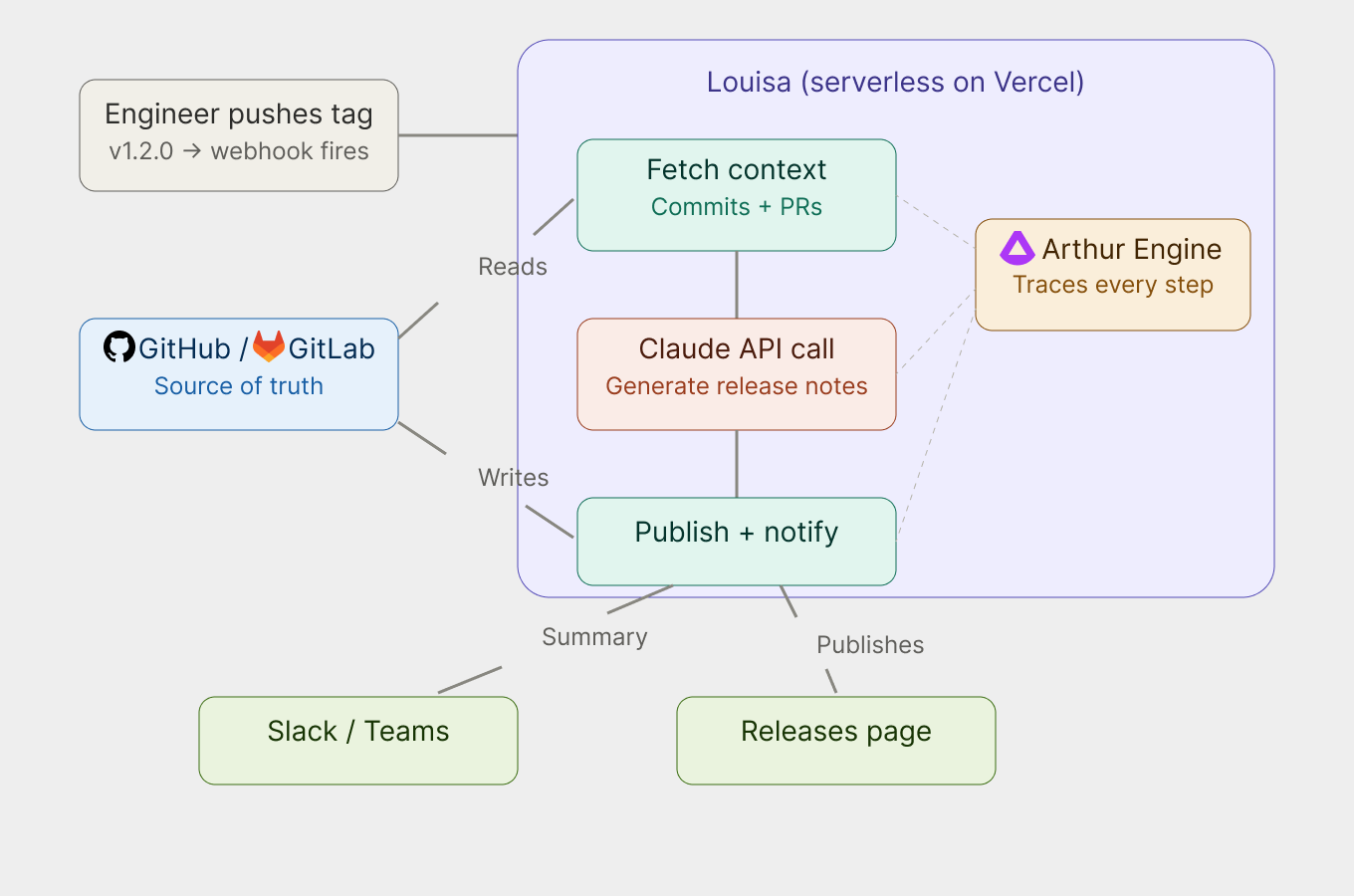
No manual steps. No copy-pasting change logs. Just push a tag.
What I love most about Louisa is that she doesn't just dump a raw list of technical changes. The notes she generates lead with the benefit to the user, as in what did this release actually improve, not just here's what the code did. That's a surprisingly hard thing for humans to write consistently, and she does it reliably every time… with an optimized, tested and experimented prompt.
How I Built Her (And Why You Can Do It Too)
Here's the part I want to be honest about: I am a Product Manager, not a software engineer.
I did not write Louisa by typing out thousands of lines of code by hand. I built her using Claude Code, Anthropic's agentic coding tool, which let me describe what I wanted in plain language and helped me iterate quickly without needing to know every technical detail from memory.
The stack is approachable:
- Claude Code — the AI coding assistant I used to build Louisa herself (yes, AI-assisted development to build an AI agent)
- Anthropic's Claude API — the AI model powering Louisa's release note generation, via the official @anthropic-ai/sdk
- Vercel — for deploying Louisa as a serverless function (free tier works fine)
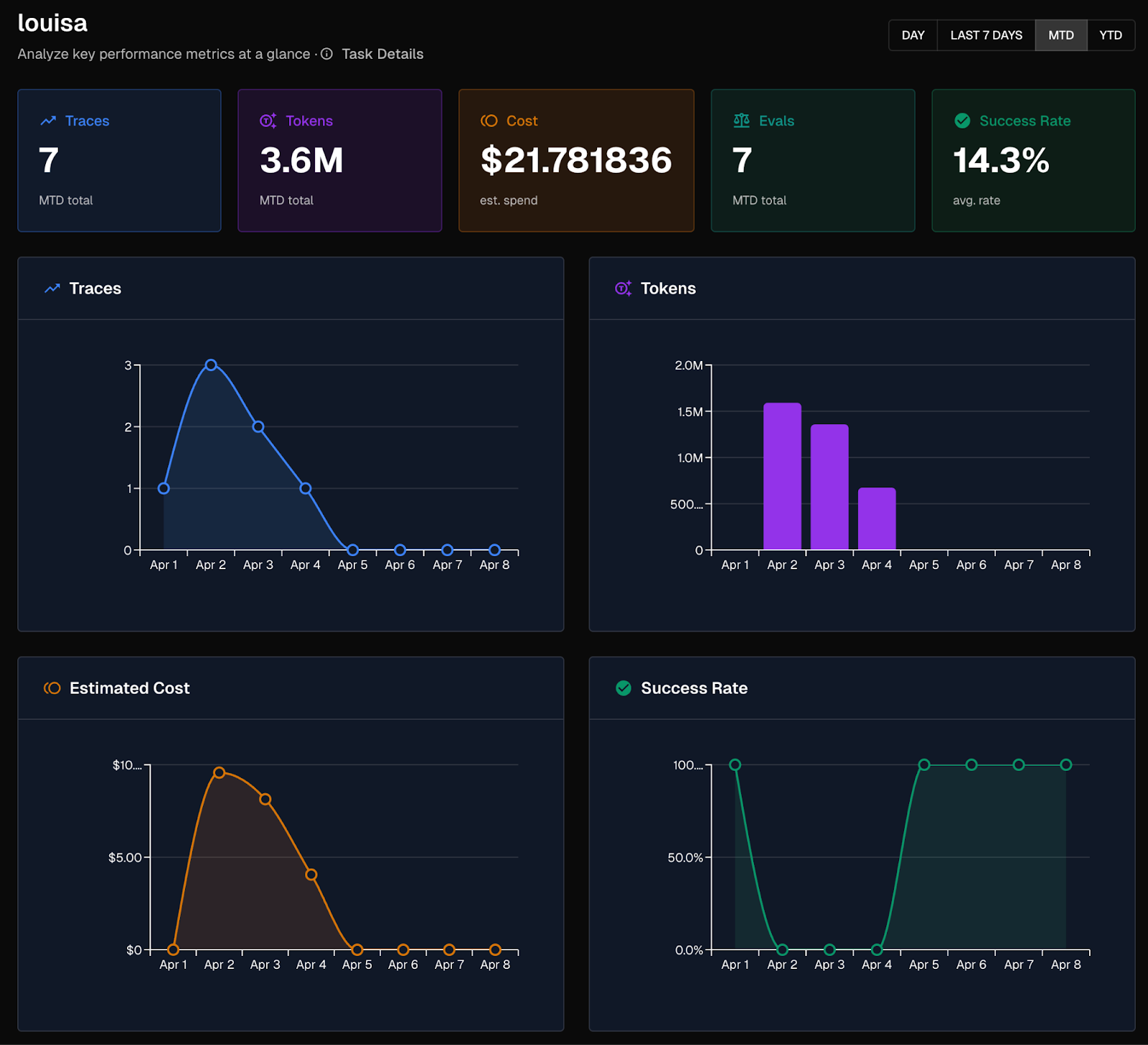
- Arthur Engine — for observability, tracing every step of Louisa's work so I can see exactly what she does and how she performs (also free and open-source)
That last one, the Arthur Engine, is not just a nice-to-have. It's the difference between having a bot and having a reliable AI system. More on that in a moment.
The whole thing runs on Node.js. The setup is a git clone, a few environment variables, a Vercel deploy, and configuring a webhook. If you've ever set up a Slack integration or connected a tool via API keys, you can do this (or you can ask Claude to do it for you). It’s really that simple.
AI Agent vs. Workflow: What's the Real Difference?
I want to demystify something, because I think the phrase "AI agent" makes people picture something far more complicated than what most agents actually are.
Everyone's calling everything an “agent” right now. Chatbots, automations, scheduled scripts with an LLM bolted on. The word has gotten loose, and that looseness matters, especially if you're trying to build something reliable.
Anthropic, the team behind Claude, draws a clear line in their own engineering guidance: workflows are systems where the steps are predefined in code. Agents are systems where the LLM itself decides what steps to take and in what order. The difference is who's in control of the logic.
"An AI agent is a system where the LLM itself decides what steps to take and in what order. A workflow is a system where those steps are predefined in code. The difference is who controls the logic."
So while Louisa is (technically) an AI-powered workflow. That's not a limitation. That's a design choice, and honestly, for most everyday work problems, it's the right one. Workflows are predictable. They're debuggable. They do exactly what you tell them, every time.
The reason this distinction matters isn't pedantic. It's practical. If you understand what you're actually building, you can instrument it correctly, evaluate it properly, and know what "good" looks like. That's the whole philosophy behind the Arthur Engine, and it's why teams that ship reliable AI systems tend to be precise about what they've built.
You don't need a true autonomous agent to get serious value from AI. You just need the right workflow, built well.
Why AI Observability Is Non-Negotiable for Reliable Agent
Here's something I learned building Louisa that I didn't expect: getting an AI system to work is the easy part. Getting it to work reliably is where things get interesting.
The Arthur team has written extensively about this in our Best Practices for Building Agents series. The core insight from Part 1: Observability and Tracing is that the teams who instrument their agents from day one are the ones who ship with confidence, and the ones who don't get stuck in demos.
Louisa ships with full observability built in via the open-source Arthur Engine. Every release generation, from the first API call to fetch commits through the Claude LLM response to the final Slack notification, is traced end-to-end. I can see exactly what happened on any given release: what context went into the prompt, how many tokens it used, what Claude generated, where any errors occurred.
Here's what a complete Louisa trace looks like in the Arthur Toolkit:
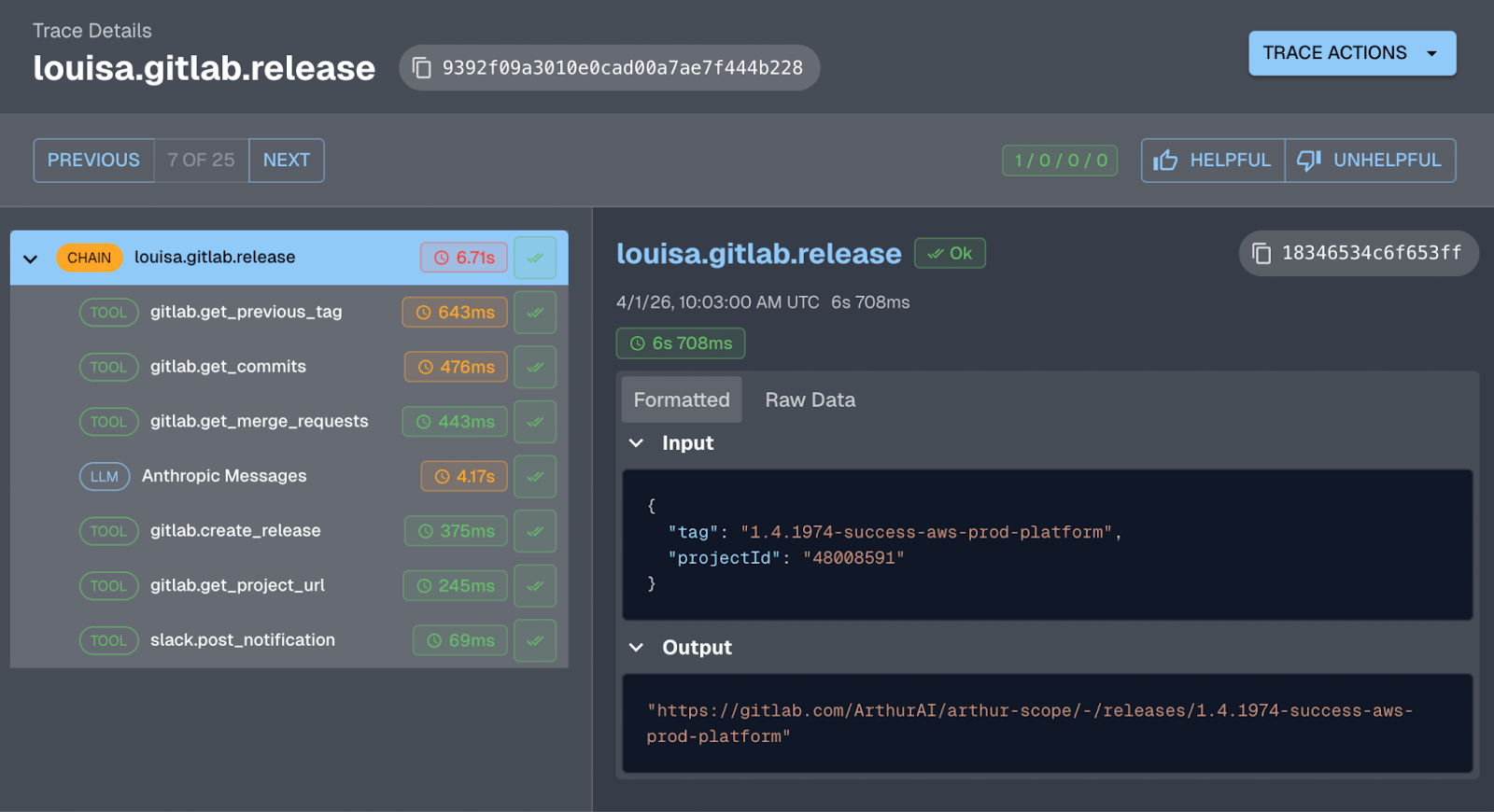
Without this, if Louisa produced a bad set of release notes, I'd have no idea why. Was it the prompt? The commits? An API error? Tracing makes the agent debuggable. It turns a black box into something you can actually understand and improve.
Sound famiar? Another PM at Arthur built a Claude Code-powered Jira bot that turns messy Slack thread discussions into structured Jira tickets. Same story: it worked quickly, but the gap between "it works" and "it works well" was closed entirely through observability. You can't fix what you can't see.
Prompt Engineering: The Most Underrated Part of Building an AI Agent
One thing that surprised me when building Louisa: so much of what makes her good is not the code. It's the instructions I give Claude in the prompt.
Louisa's release notes are good because I spent time on her system prompt. I told her to group changes by product area rather than by change type. I told her to lead every bullet with the user benefit, not the code change. I told her to filter out CI pipeline updates and merge commits that don't mean anything to end users.
That's prompt engineering, and it doesn't require a computer science degree. It requires thinking carefully about what "good" looks like and articulating it clearly. If you can write a good creative brief, you can write a good system prompt.
Part 2 of Arthur's best practices series covers prompt management in depth, specifically why prompts should live outside your application code so you can iterate on them without redeploying the whole system. Louisa's prompts are modular by design: there's a separate Claude prompt for the code repos and one for content pipeline, and each one can be customized independently.
Making Louisa Actually Reliable
Getting release notes to appear is table stakes. Getting them to appear consistently, correctly, without hallucinations, every single time is the actual goal.
Part 3 of the best practices series makes a point I found really clarifying: AI agents and systems are non-deterministic. An agent that performs well today might not perform identically tomorrow, especially as your data changes. Continuous evaluations, automated checks that run against your agent's real output, are how you catch problems before users do.
And Part 4 takes it further: once you know that something is failing, you need a structured way to test changes, compare prompt versions, and make sure a fix for one problem doesn't break something else. Agent improvement is an iterative experimental process, not a one-time fix.
I think about this when I look at Louisa. She's a v1. She works well. But the path to her working even better runs through exactly this loop: trace what she's doing, define what "good" looks like, test changes, verify they helped.
What I'd Say to Anyone Thinking About Building Their Own “Agent” (or AI workflow)
Start with one frustration. One task that you do manually and resent.
It doesn't have to be release notes. It could be a weekly status report pulled from different tools, a first-pass response to a category of support tickets, a summary of meeting notes sent to the right Slack channel, or a checklist that runs before every deployment.
Pick something where the inputs are available programmatically (via an API or a webhook), where the output is clear, and where the value of not doing it manually is obvious. That's your first “agent”.
You don't need to know how to code from scratch. Tools like Claude Code let you describe what you want and get most of the way there. What you do need is a clear sense of what the “agent” should do, what a good result looks like, and the patience to iterate when it doesn't get it right the first time.
The people who will be most prepared for the future state of the workforce are the ones building things now, even small things, even imperfect things, rather than waiting for the perfect moment to start.
Start using these tools and experimenting today. So you can better understand what's coming.
Frequently Asked Questions
What is the difference between an AI agent and an AI workflow?
A workflow is a system where the steps are predefined in code. An agent is a system where the LLM itself decides what steps to take and in what order. The key difference is who controls the logic — the developer or the model.
Do I need to know how to code to build an AI agent or workflow?
No. Tools like Claude Code let you describe what you want in plain language. What matters more is having a clear sense of what the system should do and what a good result looks like.
What is prompt engineering and why does it matter for AI agents?
Prompt engineering is the practice of writing precise instructions for an LLM. For AI agents and workflows, the prompt is often what determines quality — not the code. If you can write a good creative brief, you can write a good system prompt.
Why is observability important for AI agents?
AI systems are non-deterministic — they can behave differently across runs. Observability (tracing each step of an agent's execution) is how you debug failures, understand outputs, and improve performance over time. Without it, you're flying blind.
What is the Arthur Engine?
The Arthur Engine is a free, open-source tool for AI observability and evaluation. It traces every step of an AI agent or workflow so you can see exactly what happened, measure performance, and catch regressions before users do.
You Too Can Build Your Own Louisa
Louisa is free, open-source, and ready to deploy to your own project repos today.
Get started on GitHub: github.com/arthur-ai/louisa
Out of the box, she handles automated release notes for GitHub and GitLab. But the architecture, a webhook listener, an LLM call, an action, is a template for any “agent” you want to build. Fork her, adapt her, and build something that solves a problem that's been quietly annoying you for months.
The only thing you have to do is start.
Want to go deeper on building reliable agents? Check out Arthur's Best Practices for Building Agents series, including Part 1: Observability and Tracing, Part 2: Prompt Management, Part 3: Continuous Evaluations, and Part 4: Experiments & Supervised Evals. And if you're building an internal tool and want to see what the path from prototype to production looks like in practice, read about how we turned a vibe-coded Jira bot into a reliable agent in two weeks.
SHARE


