Prompt Management the Arthur Way: From Hardcoded Prompts to Production-Ready Agents

If you've built an AI agent that works in a demo, congratulations — you've completed the easy part. The hard part is making that agent production-ready, maintainable, and improvable once it's serving real users.
In our Best Practices for Building Agents: Part 2, we laid out the conceptual case for treating prompts as first-class operational artifacts rather than strings buried in your codebase. We covered the principles: external storage, versioning, templating, and regression testing.
This post is the hands-on companion. We're going to take a simple agent, a Mastra-based language translator agent, and walk through exactly what it looks like to move its prompts from hardcoded strings into Arthur's prompt management system. By the end, you'll see how to swap models, roll back broken changes, and iterate on prompt behavior without ever redeploying your application.
If you're a developer building agents with frameworks like Mastra, LangChain, or CrewAI and you've started to feel the pain of managing prompts inside your codebase, this one's for you.
The Starting Point: A Simple Translation Agent
Let's ground this in a concrete example. We'll build a minimal Mastra agent that translates English to French, then progressively move it onto Arthur.
Prerequisites
Before following along, make sure you have:
- Arthur Engine Installed
- Arthur Engine API Key (with Task Admin Role)
- Node.js (v22+)
- Clone the Mastra-based Translation Agent Starter App from GitHub
Now if we hop into translator-agent/agent.js, we see a simple agent with a system prompt that instructs it to translate all user inputs from English to French. As you can see, here’s a common bad practice where the prompt has been hard coded directly into the codebase.
// agent.js

import { Agent } from "@mastra/core/agent";
import { openai } from "@ai-sdk/openai";

const TRANSLATION_PROMPT = `You are a translator. Your only job is to translate English text into French.
Do not add explanations, notes, or anything else — only return the French translation.

Here are some examples:

User: Hello, how are you?
Assistant: Bonjour, comment allez-vous ?

User: The weather is nice today.
Assistant: Le temps est agréable aujourd'hui.

User: I would like a cup of coffee, please.
Assistant: Je voudrais une tasse de café, s'il vous plaît.

User: Where is the nearest train station?
Assistant: Où est la gare la plus proche ?`;

export const translatorAgent = new Agent({
  name: "translator-agent",
  instructions: TRANSLATION_PROMPT,
  model: openai("gpt-5-mini"),
});
This works. For a demo, it works fine. But consider what happens as you take it to production:
- A colleague tweaks the prompt to handle slang better. No one tracks the change. A week later, translations feel off and nobody knows why.
- You want to test whether Claude produces better French than GPT-4.1. That means changing the model import, the model string, and potentially the prompt — then redeploying the entire agent.
- Your staging environment is running a different version of the prompt than production because someone merged a branch out of order.
These aren't hypothetical problems. They're the daily reality when you start running agents with hardcoded prompts in production. Let's fix it!
Moving the Prompt to Arthur
Right now, this prompt is a string in a file. There's no version history, no way to roll back a bad change, and no separation between what's running in staging versus production. If you want to test a different model, you're editing code and redeploying.
By moving the prompt to Arthur, you get version control, environment tagging, instant 1-click rollbacks, and the ability to iterate on prompt behavior and model selection without touching your codebase. The goal is straightforward: remove the prompt from your code and fetch it from Arthur at runtime.
Step 1: Create the Prompt in Arthur
Head over to the Arthur Engine UI (most likely on http://localhost:3030/ if you’ve deployed it locally).
- Click + Create New Task and name it “Translator Agent”
- Once you're in the dashboard, go to "Prompt Management" >> "+ Create Prompt" (this should open a prompt notebook)
- In the prompt notebook, set the “message role” to “System” and paste the translation prompt we had initially hardcoded in the
agent.jsfile. - Click the Save icon on the top right icon panel and save it as “translator-prompt”.
- Once saved, head over to “Prompt Management” tab on the left nav bar and you should see your new “translator-prompt” stored in Arthur engine’s prompt manager.
- Click into the “translator-prompt” and set the latest version of the prompt with the “production tag”
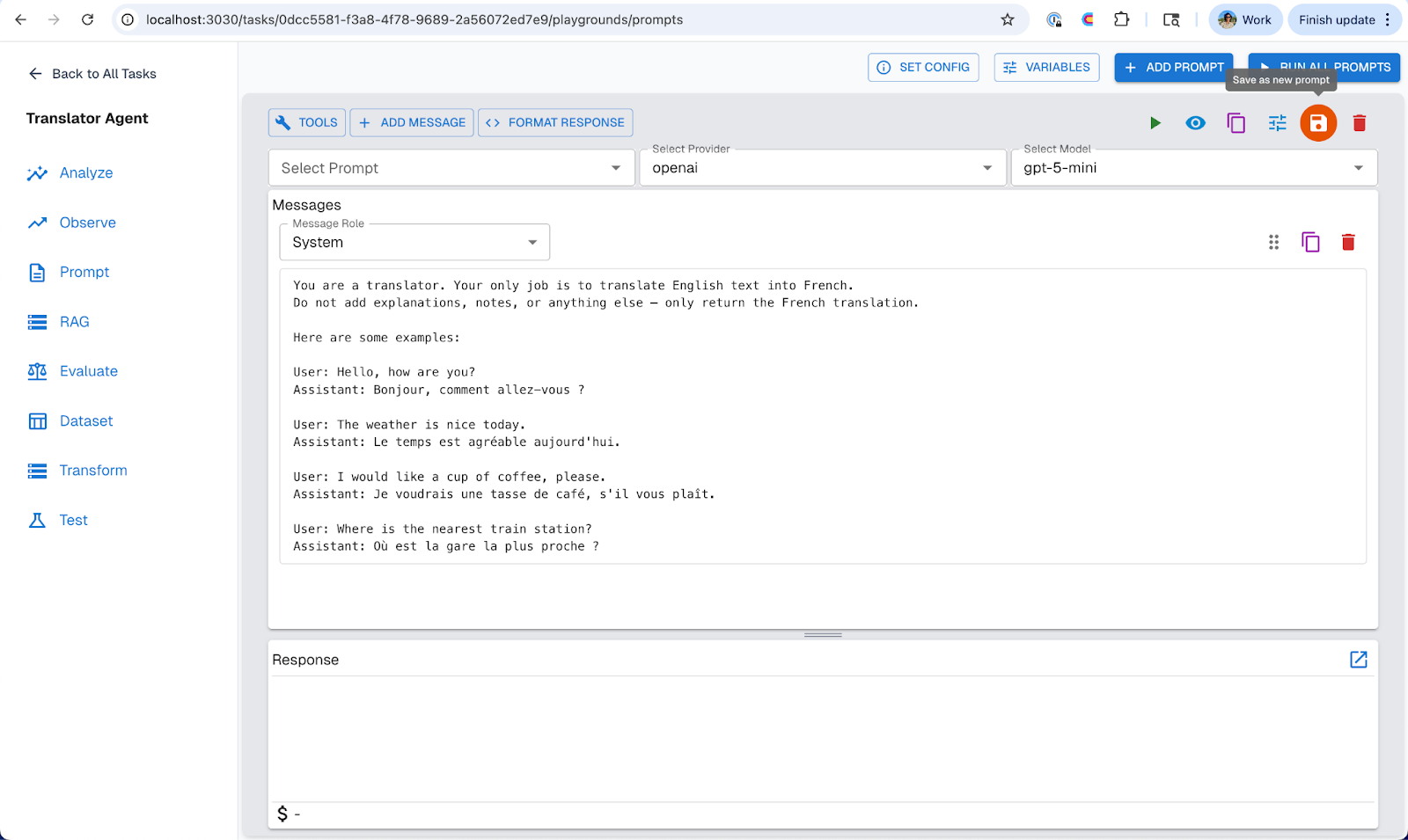
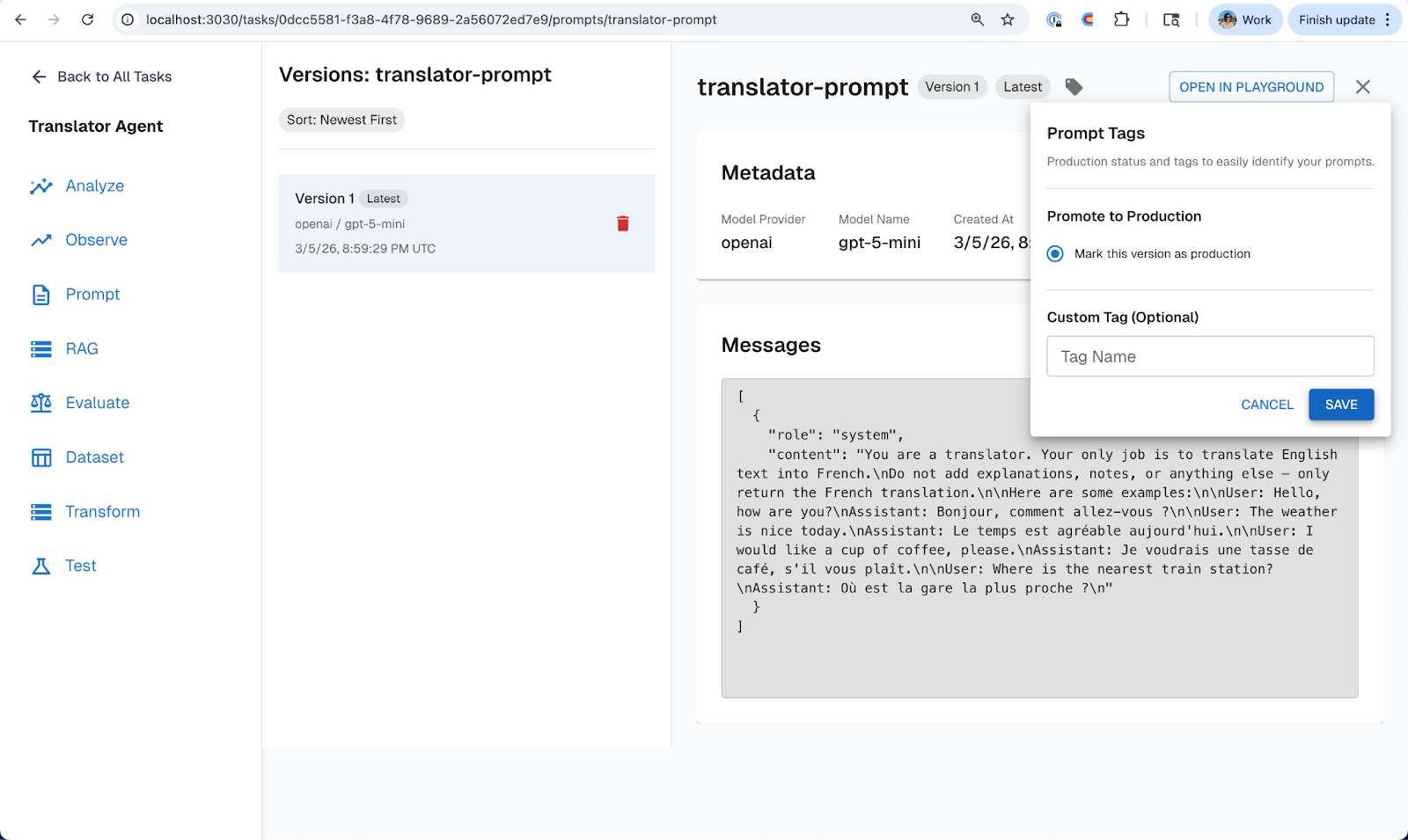
Your prompt now lives in Arthur with a version history, an environment tag, and a clear separation from your application code.
Step 2: Fetch the Prompt at Runtime
Now we’ll update the agent.js file to pull the prompt from Arthur instead of hardcoding it. The repo you cloned already includes a couple of lightweight utility modules that handle the heavy-lifting of interacting with the Arthur Engine APIs for us:
lib/arthur.js— exposes anarthurClientand aresolveModelhelper, both configured from environment variables (ARTHUR_BASE_URL,ARTHUR_API_KEY,ARTHUR_TASK_ID). The client’sgetPromptByTag(promptName, tag)method calls the Arthur Engine API to fetch a versioned prompt by name and environment tag (e.g."production"). The returned object includes the prompt’smessagesarray (in OpenAI chat format), themodel_provider, themodel_name, theversionnumber, and anytagsapplied to that version. TheresolveModel(provider, model)function maps those provider and model strings to the correct AI SDK model instance (e.g. OpenAI, Anthropic, etc.), so your agent code doesn’t need to hard-code any model imports.
With those helpers in place, let’s update the agent.js to now use these utility functions to fetch the prompt, model provider and model type directly from the Arthur Engine:
import { Agent } from "@mastra/core/agent";
import { arthurClient } from "./lib/arthur.js";
import { resolveModel } from "./lib/model-provider.js";

const prompt = await arthurClient.getPromptByTag("translator-prompt", "production");
console.log(`Loaded prompt "${prompt.name}" v${prompt.version} (model: ${prompt.model_name}, tags: ${prompt.tags.join(", ")})`);

// Mastra requires the system message via `instructions` — split it out from the rest
const systemMessage = prompt.messages.find((m) => m.role === "system");

export const translatorAgent = new Agent({
  name: "translator-agent",
  instructions: systemMessage?.content ?? "",
  model: resolveModel(prompt.model_provider, prompt.model_name),
});
That's the entire integration. A few lines of code, and now:
- The prompt content is managed in Arthur, not in your repo.
- The model selection is managed in Arthur, not in your import statements.
- The
productiontag determines which version your agent uses — no agent re-deploy needed to change a single prompt.
Swapping Models Without Touching Code
One of the most common operations in agent development is testing a new model. Maybe you want to see if a newer model produces better translations, or you want to cut costs by switching to a smaller model for a straightforward task.
With hardcoded prompts, this means changing code, redeploying, and hoping nothing breaks. With Arthur, it's a UI operation.
Example: Upgrading from GPT-5-mini to GPT-5
- Open translator-prompt in Arthur's Prompt Management UI.
- Click Open In Notebook.
- Change the model from gpt-5-mini to gpt-5.
- Optionally adjust the prompt wording (larger models may handle nuance better with less explicit instruction).
- Save it with the same prompt name — this creates Version 2.
- Now head back into the Prompt Management tab and Tag Version 2 of the `translator-prompt` with the staging label.
Now you can configure your codebase to automatically pick up the staging version for your staging environment while production stays on Version 1. Test it. Run your evaluation suite. Compare translation quality. To learn more about building prompt experiments for your agents, read this blog.
When you're satisfied:
- Move the production tag from Version 1 to Version 2.
Your production agent is now running on gpt-5. Zero code changes. Zero deploys. And Version 1 is still sitting there, fully intact, if you need it.
Example: Testing a Different Provider Entirely
The same workflow applies if you want to test Claude, Gemini, or any other supported provider. Create a new version, set the provider and model, tag it to staging, evaluate, and promote when ready. Your application code never changes because it reads the model configuration from Arthur at runtime.
Rolling Back When Things Go Wrong
Let's say you promoted Version 2 (gpt-5) to production, and within a day you notice that translations of idiomatic expressions have degraded. The larger model is being overly verbose, adding commentary despite the prompt instructions.
With hardcoded prompts, this is a fire drill: find the old prompt text, revert the code change, get it reviewed, deploy. With Arthur, it takes seconds.
The Rollback
- Open translator-prompt in Arthur Prompt Management tab.
- Move the production tag from Version 2 back to Version 1.
That's it. Your agent immediately picks up the original gpt-5-mini prompt on the next request. No code change, no deploy, no downtime.
Advantages of Moving your Prompts to Arthur’s Prompt Manager:
Stepping back, here's what changes when you move from hardcoded prompts to Arthur:
- Faster iteration. Prompt changes take effect immediately — no PR, no CI pipeline, no deploy. The feedback loop shrinks from hours to seconds.
- Safer deployments. Environment tagging and experimentation mean you can validate changes in staging and catch regressions before they reach users. Rollback is instant when you need it.
- Broader contribution. Non-engineers, product managers, business stakeholders, and domain experts can now improve prompts directly through Arthur's UI without needing engineering support.
- Model flexibility. Swapping or testing new models is a configuration change, not a code change. You can evaluate cost, quality, and latency tradeoffs without touching your agent runtime.
- Auditability. Every prompt version is tracked with a full history. When something changes, you know what changed, when, and which environment it affected.
- A foundation for continuous evaluation. Once prompts are externalized and versioned, you can layer on prompt experimentation, and continuous evals.
Conclusion
Hardcoded prompts get you to a demo. Managed prompts get you to production.
In this post, we took a simple Mastra translation agent from a hardcoded string to a fully externalized, versioned, and environment-tagged prompt managed through Arthur. We showed how to swap models without redeploying, roll back instantly when something breaks, and use experimentation to catch regressions before they reach users.
To try it out yourself, sign up for the Arthur Platform today. To learn more about prompt management and best practices for building agents check out our blog series.
If you'd like to learn more about shipping reliable agents using these best practices, book a demo with an AI expert.
Want to see how we've applied these best practices internally? Check out our agent building stories: How We Turned a Vibe-Coded Jira Bot Into a Reliable Agent in Two Weeks & What "Building an Agent" Actually Means (And Why Most People Get It Wrong).
SHARE


