How to Stop a Shadow AI Agent You Can't Modify
You stop an agent you didn't build by removing what it depends on: revoke its keys and cloud sessions, block its route to the model provider, and contain the device or workload it runs on. None of these require the agent to cooperate, and none require code access. They do require knowing the agent exists, which is why discovery comes first.
Most kill-switch advice assumes you own the runtime. For a coding agent on an engineer's laptop, a Bedrock agent a business unit stood up, or a SaaS agent with an OAuth grant into your systems, you own none of it. This piece maps the levers that still work from the outside, what each one stops, what it misses, and who has to pull it.
Why the usual kill switch doesn't apply here
When teams write a kill switch for an agent they built, they reach for a feature flag, a tool-disable toggle, or a prompt rollback. All three live inside code you control. A third-party or shadow agent gives you none of those handles. You can't push a flag to software running in a vendor's cloud, and you can't edit the prompt of a CLI agent an engineer installed last weekend.
The UK's National Cyber Security Centre makes the key point in its interim guidance on agentic AI risk, published August 2026. Being able to pull the plug, it writes, "may mean more than stopping the agentic AI processes." Your controls should cover the wider system so you can "rapidly restrict network access" and "interrupt the communications between selected AI agents and the AI model inference infrastructure." That is the whole idea behind stopping from the outside. You don't kill the agent. You cut what it needs.
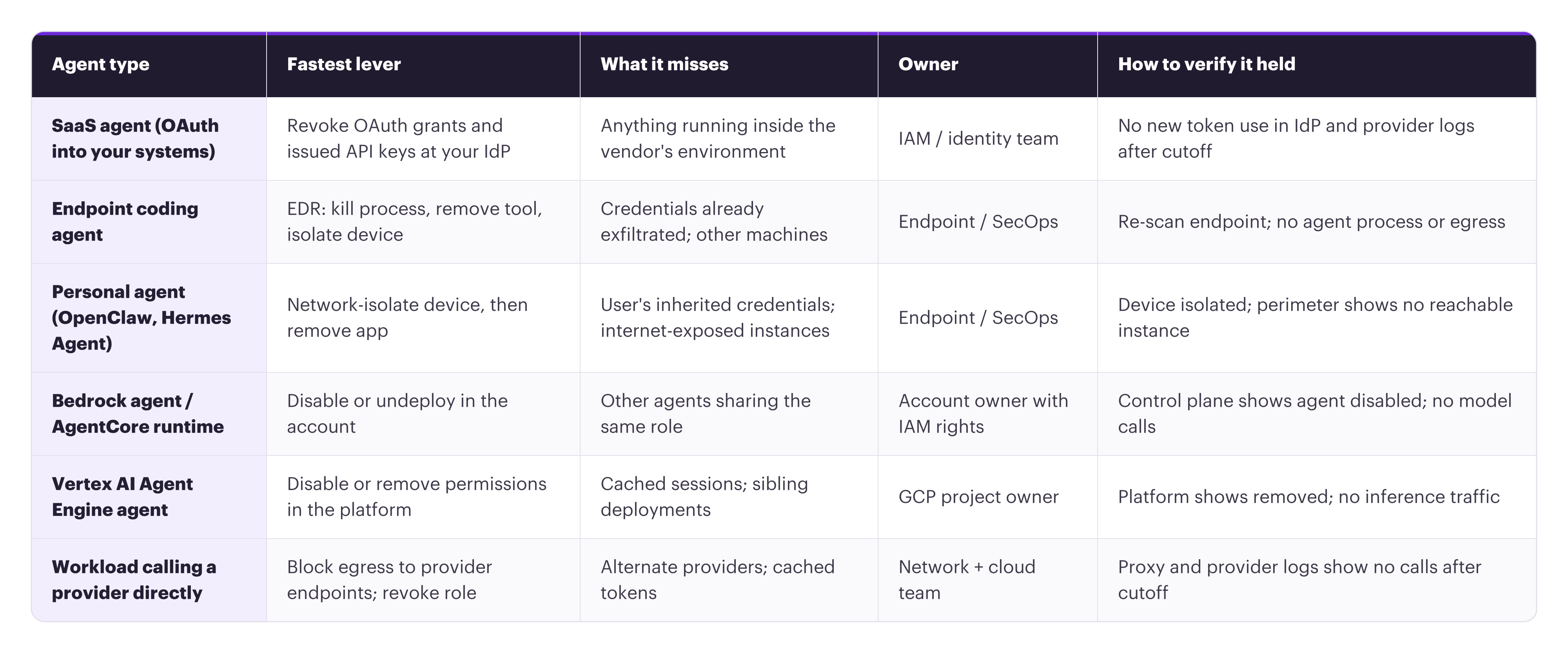
Four levers surround any agent you can't modify: the credentials it holds, the cloud role it assumes, the network path to its model, and the device or workload it runs on. Each has a different owner and a different blind spot.
Step zero: you can't stop what you haven't found
Every lever below needs a fact about the agent before you can pull it. Revoking a key needs to know which key. Cutting egress needs to know which host and which provider. Containing a device needs to know which device. An agent nobody inventoried gives you none of these, so the stop doesn't exist for it yet.
Inventory by surface: cloud AI platforms, endpoints, network egress, and the security telemetry you already collect. For each agent, record the owner, the credential it uses, the cloud role it assumes, the model provider it calls, and the host it runs on. Those five fields are not paperwork. They are your stop levers, written down in advance so you aren't reverse-engineering them mid-incident.
Lever 1: identity and credentials
The fastest way to neuter most agents is to take away the authority they carry. Revoke the API key the agent uses with the model provider. Revoke the OAuth grants it holds into your SaaS systems. The NCSC lists exactly these as an agent's "blast radius": API keys, OAuth grants, SSH keys, and any authenticated sessions it can reach.
Cloud roles need two moves, not one. In AWS, revoking a role's active sessions attaches an inline policy that denies access to anyone who assumed the role in the past, plus about 30 seconds into the future. Sessions assumed after that window are not affected, and the AWS CLI caches credentials until they expire. So session revocation buys time; it does not block the role. To actually stop the agent from coming back, you also have to stop the role from being re-assumed, by changing its trust policy or attaching an explicit deny. The service-linked role caveat matters too: you can't use session revocation on those.
What this lever misses: any other credential the agent holds. A vendor opinion piece from Tigera makes the point well. Revoking a provider key stops model calls, but not the Model Context Protocol and agent-to-agent calls "which never used that key." Cached tokens, a second API key, or a sideways path through another agent all survive a single revocation. Credential revocation is necessary and rarely sufficient on its own.
Lever 2: cloud control plane
For agents running on a managed platform, the platform owner holds a direct off switch. Bedrock agents and AgentCore runtimes, Vertex AI Agent Engine deployments, and similar managed services can be disabled, undeployed, or stripped of permissions from the console or the platform API. Check each provider's current documentation for the exact action; the names change, and inventing them helps no one.
The catch is organizational, not technical. The person who can disable a Bedrock agent is whoever holds the right IAM permissions in the account where it runs, and in a shadow-agent situation that may be a business unit, not your security team. Decide in advance who can pull this lever in each account, and make sure they can be reached at 2 a.m. A control plane off switch you can't actually invoke during an incident is a diagram, not a control.
Lever 3: network egress
If you can't touch the agent or its credentials fast enough, cut its route to the model. Block the host's or workload's path to the provider's inference endpoints at the proxy, firewall, or DNS layer. This is the NCSC's "interrupt the communications between selected AI agents and the AI model inference infrastructure," and its network maturity model treats restricting access to just the model API, or denying external access entirely, as the top two levels.
The trade-off is bluntness. A broad block at the network edge can take down sanctioned AI on the same segment along with the agent you're chasing. Prefer per-workload or per-identity rules over a segment-wide hammer. Deny-by-default egress with an allowlist, built before any incident, turns this lever from a sledgehammer into a scalpel. Built during an incident, it tends to break more than it fixes.
Lever 4: endpoint containment
Local agents run where your MDM and EDR already have reach. For coding agents, personal agents like OpenClaw and Hermes Agent, AI browsers, and browser-extension agents, the containment actions are the familiar ones: remove the app or extension, kill the process, network-isolate the device, or revoke the local tokens the agent is using.
Remember what a local agent can touch. The NCSC's lowest compute-isolation level is an agent running on the host "alongside other workloads and data," where it "may also be able to use credentials that are available to the user account under which it is running." A personal agent on an engineer's laptop inherits that engineer's logged-in access. OpenClaw's own history underlines the stakes: CVE-2026-25253, a one-click remote code execution flaw rated CVSS 8.8 and patched in version 2026.1.29, let a crafted link open a WebSocket and hand over a token without prompting. Containing the device is often the only lever that addresses what the agent already did, not just what it does next.
Which lever, when
Verify the stop
Pulling a lever is not the same as the lever holding. After any stop, check provider-side or proxy logs for calls made after your cutoff time. A single successful model call at 2:14 when you revoked at 2:10 tells you a cached credential or second path is still live. Then re-run discovery to confirm the agent is gone or dormant rather than quietly relocated. The agent that matters most in a verification pass is the one your first lever missed.
Where Deckard fits, and where it doesn't
Every lever above starts with a fact you have to know: which host, which IAM role, which provider, which device. Deckard, Arthur's free, open-source, read-only scanner, is built to surface exactly those fields. It finds agents across cloud AI platforms (Vertex AI Agent Engine, Bedrock agents and AgentCore runtimes, plus the IAM roles CloudTrail shows calling Bedrock), across endpoints through an osquery collector on macOS and Linux via Jamf Pro, Compute Engine, EC2, or a local scan, and across network logs where workloads call model providers. It sends one event per agent to Splunk or any HTTPS webhook, and it reports its own blind spots so a source it couldn't read becomes an alert instead of a silent gap.
State the limit plainly: Deckard does not block, stop, or remediate anything. It finds. The host, role, and workload it hands you are the inputs to the levers; the stop itself runs in your IAM, network, MDM or EDR, and cloud tooling. It covers macOS and Linux endpoints, not Windows, and it tells you an agent is present, not whether it is exposed to the internet or acting maliciously.
Discovery is step zero, not the whole job. The practices that keep a found agent under control, ownership, policies, monitoring, and alerting that your systems can act on, are where the Arthur Platform picks up: triage every agent, assign an owner, apply guardrails and policies that return verdicts your application enforces, and route alerts into your automation. Arthur does not ship a kill switch. It tells you which agents exist and whether they're behaving, so the levers you pull are the right ones. Treating the agent explosion as something to inventory before it becomes an incident is what makes any of these stops possible in the first place.
FAQ
Can I stop a third-party SaaS agent without the vendor? Partly. You can revoke the OAuth grants and API keys you issued and block its access at your identity provider. What runs inside the vendor's environment is under the vendor's control, so put stop and notification terms in the contract before you sign it.
Is blocking the model provider's domain enough? It stops model calls from that network path. It does not stop agents on other networks, agents using a different provider, or actions already queued with tools. Use it as one lever, not the only one.
Does revoking AWS role sessions stop the agent? Only for credentials issued before the cutoff, and only for about 30 seconds into the future. If the agent can assume the role again, it gets fresh credentials. Block re-assumption with a trust policy change or explicit deny, and remember the CLI caches credentials until they expire.
Find the agents first, then pull the right lever. You can map your agent footprint today with Deckard, the free open-source scanner, or book time with our team to see how Arthur triages, governs, and monitors the agents you find.
SHARE


