How to Detect Workloads Calling OpenAI and Anthropic APIs From Network Logs
Most shadow AI detection looks at browsers and endpoints. It misses the quieter population: servers, containers, and scheduled jobs that call an LLM API directly, with no human at a keyboard. Those workloads leave a trail in your network logs, and if you already collect DNS query logs you can find them today.
This post gives cloud security engineers and SOC analysts the queries to detect workloads calling OpenAI, Anthropic, and Amazon Bedrock APIs from DNS logs, how to tell a workload apart from a person using a browser, what hides the traffic, and how to turn the findings into an agent inventory.
One scope note before the queries: DNS and flow logs tell you which host resolved or connected to an LLM API hostname. They do not reveal prompts, completions, or the content of any request, because that payload is inside TLS. Everything below detects the presence and source of AI API calls, not what those calls said.
How can I detect workloads calling OpenAI or Anthropic APIs from network logs?
Start with DNS. Before a workload calls an LLM API, it resolves the API hostname, and that resolution lands in your DNS query logs with a source you can attribute to an instance, task, or pod. DNS gives you the one thing flow logs don't: the hostname.
The detection has four steps:
- Collect DNS query logs (Route 53 Resolver on AWS, Cloud DNS logging on Google Cloud).
- Match queries against a list of LLM API hostnames.
- Attribute each match to a source workload, not just an IP.
- Separate machine callers from humans browsing, then route the workloads into your agent inventory.
Which hostnames do LLM APIs use?
Your match list is only as good as the hostnames in it. The table below separates hostnames confirmed from vendor and platform documentation from ones you should verify against current vendor docs before you deploy, since API domains change.
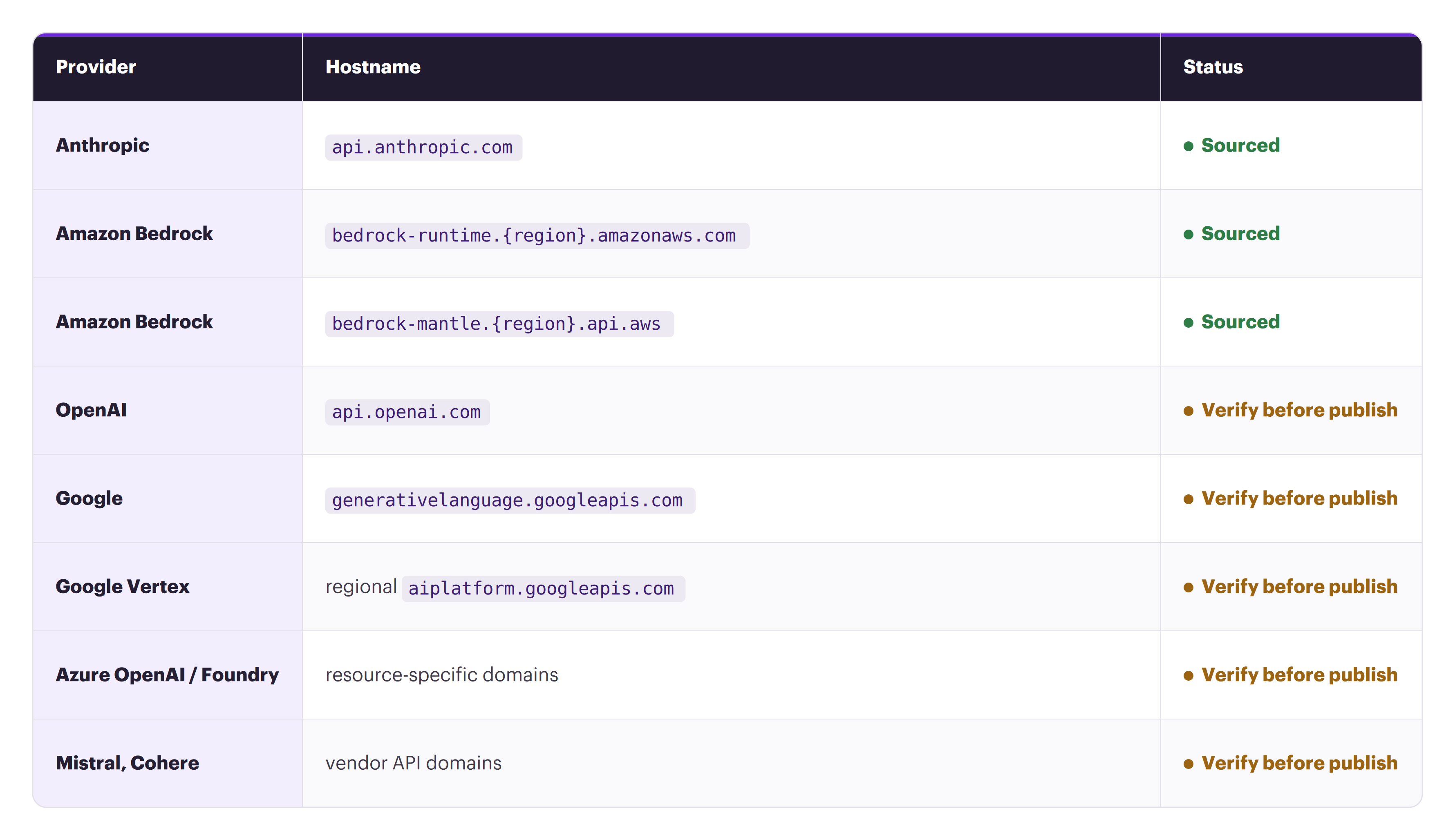
Treat the "verify" rows as placeholders until you confirm them against the provider's current API reference. Azure in particular uses per-resource domains rather than one fixed hostname, so you'll build that part of the list from your own tenant.
How do I query Route 53 Resolver query logs for AI API calls?
Route 53 Resolver query logging records DNS queries that originate in your VPCs and use the Route 53 Resolver. You can send those logs to CloudWatch Logs, S3, or Kinesis Data Firehose. The log records include the query name, query type, response code, the response data (RDATA), the source IP address, and source identifiers including the EC2 instance ID.
That instance ID is what makes attribution work. A flow log would give you an IP; the Resolver log ties the lookup to a named source.
Query it in CloudWatch Logs Insights against your Resolver query log group:
# CloudWatch Logs Insights, Resolver query log group
fields @timestamp, query_name, srcaddr, srcids.instance
| filter query_name like /(api\.openai\.com|api\.anthropic\.com)\.?$/
| stats count(*) as queries, earliest(@timestamp) as first_seen by srcids.instance, srcaddr, query_name
| sort queries desc
If the fields aren't auto-discovered in your log group, parse the raw JSON @message instead. This follows AWS's own documented parse pattern for Resolver logs:
# Variant using AWS's documented parse pattern if fields are not auto-discovered
fields @timestamp, @message
| parse @message /"query_name":"(?<qname>[^"]+)"/
| parse @message /"srcaddr":"(?<src>[^"]+)"/
| filter qname like /(openai|anthropic)\.com\.?$/
| stats count() by src, qname
Watch the trailing dot. Resolver query_name values end with a trailing dot (api.openai.com.), which is why the regexes above allow an optional \.? at the end. A filter that forgets this will silently return nothing.
Once the Bedrock hostnames are in scope, add bedrock-mantle.*.api.aws and bedrock-runtime.*.amazonaws.com to the regex.
How do I query Google Cloud DNS logs for AI API calls?
Google Cloud DNS logging captures queries handled by Cloud DNS for your VPC networks, written to Cloud Logging. The approach mirrors the AWS one: filter the log entries for LLM API hostnames, then group by source.
Confirm the exact Cloud Logging resource type and payload field names against Google's current Cloud DNS logging documentation before you build the filter, because the field path for the query name and the source differs from the AWS schema and from other Google log types. Build the filter in Logs Explorer or query it with the Logging query language once you've confirmed the field names, matching on the hostnames in your list and grouping by the originating VM or workload identity.
Why aren't VPC Flow Logs enough?
Flow logs record IP addresses and ports, not hostnames. An LLM API call in a flow log looks like a connection to one of the provider's IPs, and those IP ranges are large, shared across many services, and change over time. You cannot reliably reverse an IP to "this was an OpenAI call."
Flow logs are still useful as corroboration: once DNS tells you an instance resolved api.anthropic.com, a flow log can confirm a connection followed to a matching address around the same time. But DNS is the primary signal, and flow logs are the second. Do not treat provider IP allowlists as a reliable detection mechanism; they drift, and matching on them produces both misses and false positives.
How do I tell a workload from a human using a browser?
Not every LLM API lookup is a shadow agent. Someone using a vendor's web app from a corporate VDI also generates DNS traffic. Use these heuristics to lean toward "workload," treating them as guidance rather than proof:
- The source is an instance ID, ECS task, or pod rather than a VDI pool or an egress proxy shared by human users.
- The query cadence is steady and machine-periodic, the kind of regular interval a cron job or polling loop produces rather than the bursty pattern of a person.
- The hostnames are API hostnames (
api.openai.com), not the consumer web hostnames a browser would hit.
None of these is conclusive on its own. A workload behind a shared proxy can look human, and a power user running a script can look like a workload. Combine the signals and confirm the ambiguous cases with the workload's owner.
What hides AI traffic?
Several common setups make this detection harder, and you should know where your coverage has holes.
AI gateways collapse many callers into one egress. Tools like LiteLLM, Kong, and Cloudflare AI Gateway sit between your workloads and the provider, so from the network's point of view every call comes from the gateway. DNS logs will show the gateway resolving the API hostname, not the dozens of services behind it. To see those callers, read the gateway's own admin API, which knows who called through it. Arthur's engine treats a gateway like this as a separate source class rather than a single opaque caller; confirm the exact behavior against the arthur-engine implementation before relying on it.
Encrypted DNS and hardcoded resolvers bypass Resolver logging. A workload using DNS-over-HTTPS, or one configured to hit a public resolver directly instead of the VPC resolver, won't appear in Route 53 Resolver logs at all. Where you can, require workloads to use the VPC resolver so their lookups are logged.
TLS hides the request content, not the destination. The hostname is visible during resolution (DNS) and, in many setups, in the TLS SNI field at connection time. What stays encrypted is the body: the prompt, the completion, and any data in the call.
How do I turn findings into an AI agent inventory?
A list of instances calling LLM APIs is a starting point, not an inventory. To make it governable, each finding needs an owner, a purpose, and a place in a registry. The discipline is the same one that works for discovery broadly: send agent signals to a centralized, well-known destination so a new workload calling an LLM API becomes a reviewable record rather than a line in a log nobody reads. For the mechanics of capturing and routing those signals, the foundation is agent telemetry and tracing.
From there, correlate the network finding with your other discovery sources. An instance that shows up in DNS logs calling Anthropic, and also runs a known agent framework, is the same agent seen two ways. Deduplicating across signals is how you move from "something here calls an LLM" to "this agent, owned by this team, calls this provider for this reason."
FAQ
Can VPC Flow Logs show which service called OpenAI? Not on their own. Flow logs record IPs and ports, not hostnames, and provider IP ranges are shared and shifting. Use DNS query logs for the hostname and attribution, and flow logs only to corroborate.
Does TLS hide the destination? TLS hides the request and response content. The destination hostname is still visible in the DNS lookup, and often in the TLS SNI field at connection time. The prompt and the data in the call stay encrypted.
How do AI gateways affect detection? Gateways like LiteLLM, Kong, and Cloudflare AI Gateway make every call appear to come from the gateway, hiding the real callers from DNS logs. Read the gateway's admin API to recover which workloads called through it.
How often do LLM API IP ranges change? Often enough that you should not build detection on IP allowlists. Match on hostnames in DNS logs instead, and refresh your hostname list against vendor docs since API domains also change over time.
Ship this with Deckard
The queries above find the calls. Deckard turns them into a maintained inventory you don't have to hand-build.
Deckard is Arthur's open-source agent discovery tool. DNS and proxy logs usually already live in your SIEM, and Deckard can query Splunk Enterprise and Elastic Security as discovery sources, with Elastic Security running customer-authored ES|QL (confirm the current source connectors in the repo README). It reads what's already there rather than asking you to stand up new pipelines.
For each workload calling an LLM API, Deckard emits a normalized arthur.discovery.agent event, deduplicated against your other discovery signals, so one server that shows up in DNS logs calling Anthropic and also runs a known agent framework becomes a single record with one owner, not two half-findings. You can route those events to Splunk, Elastic, or a webhook and feed them straight into the agent inventory your governance and SOC teams already watch.
Three ways to start:
- Clone the repo: github.com/arthur-ai/deckard. Point it at your existing SIEM sources and run the catalog against your own traffic.
- Read the catalog: the LLM API hostnames and agent identifiers Deckard matches on are maintained in the open, so you can see exactly what it looks for and contribute hostnames as vendor domains change.
- See it end to end: book a demo to watch agent discovery work across network, endpoint, and cloud in one place, with discovered workloads triaged, assigned owners, and governed.
SHARE


