Can osquery Detect AI Agents? Tables, Queries, and Identifiers for Coding Assistants
AI coding agents now run on more developer laptops than any other kind of autonomous agent, and most of them arrived without a procurement ticket. If your organization already runs osquery, directly, through Fleet, or inside an EDR, you have a way to see them. This post gives you the tables, the verified identifiers, and the queries to find Claude Code, Cursor, GitHub Copilot, Codex, and others across your fleet, plus how to get the findings into your SIEM.
One scope note before the queries: osquery reports installed and running software, packages, extensions, files, and processes. It does not see prompts, the code sent to a model, or network content. Everything below detects the presence and configuration of coding agents, not how anyone uses them.
Can osquery detect AI agents and coding assistants?
Yes, through five kinds of evidence: installed applications, package manager records, editor and browser extensions, state directories on disk, and running processes. No single table catches every agent, because these tools ship in different shapes. Cursor is a desktop app. Claude Code and Codex CLI install through npm. Copilot is an editor extension. Each leaves a different trail.
What osquery can see, and what it cannot
osquery can see:
- Installed desktop applications (name, path, version, bundle identifier)
- Packages installed through npm, Homebrew, pip, apt, and rpm
- VS Code and Chrome extensions
- Files and directories, including the state directories agents create
- Running processes
osquery cannot see the content of what those tools do. It does not capture prompts, the source code a developer sends to a model, or the body of network requests. If someone asks whether osquery tells you "which developers are using AI," the honest answer is that it tells you which machines have AI coding agents installed and running, which is the inventory question, not the usage question.
Which osquery tables find AI coding agents?
apps (macOS), programs (Windows), deb_packages and rpm_packages (Linux)
The apps table is macOS only. It exposes name, path, bundle_identifier, bundle_short_version, and bundle_version, among other columns. bundle_identifier uses case-insensitive collation, so matching does not depend on exact casing.
-- macOS desktop agents by bundle ID (verify IDs in ai-detection-spec docs/agents.md)
SELECT name, bundle_identifier, bundle_short_version, path
FROM apps
WHERE bundle_identifier IN (
  'com.todesktop.230313mzl4w4u92',
-- Cursor (verify)
'com.openai.chat', -- ChatGPT desktop, legacy ID (verify)
'com.openai.codex' -- ChatGPT desktop, current ID (verify)
);
On Windows, query programs. On Linux, deb_packages and rpm_packages cover anything installed through the system package manager.
npm_packages, homebrew_packages, python_packages for CLI agents
Many terminal coding agents install through npm. In testing against osquery 5.23.1, the ai-detection-spec PR #141 observed npm_packages rows under /usr/local/lib/node_modules. Query by scoped package name where possible, because the unscoped names collide with unrelated software (more on that below).
-- Terminal coding agents installed via npm (identifiers from ai-detection-spec PR #141; verify)
SELECT name, version, path
FROM npm_packages
WHERE name IN (
  '@ampcode/cli', '@sourcegraph/amp',
-- Amp, current and legacy
'@factory/cli', 'droid', -- Factory Droid, current and legacy
'@charmland/crush', -- Crush
'@qwen-code/qwen-code', -- Qwen Code
'@google/jules', -- Jules CLI
'@jetbrains/junie', '@jetbrains/junie-cli' -- Junie, current and legacy
);
homebrew_packages covers Homebrew installs, and it includes Casks as of osquery 5.12.1. python_packages catches agents distributed on PyPI (for example, aider installs as aider-chat; verify).
vscode_extensions and chrome_extensions for IDE and browser agents
The vscode_extensions table was added in osquery 5.11.0, and it includes VS Code Insiders from 5.15.0. This is where Copilot, Cline, and similar editor agents show up.
-- Editor extensions and Homebrew (add verified Copilot, Cline, and other IDs from the catalog)
SELECT name, version, path FROM vscode_extensions;
SELECT name, version, path FROM homebrew_packages;
chrome_extensions covers browser-based assistants.
file and processes for state directories and running agents
Several agents create a state directory on first run. PR #141 verified ~/.factory, ~/.qwen, ~/.jules, ~/.junie, and ~/.vibe, the Junie shim at ~/.local/bin/junie, Mistral Vibe as a uv tool directory (PyPI mistral-vibe), and the Debian package crush. A state directory is strong evidence an agent has actually run, not just that a binary sits on disk.
Query these with the file table (confirm the home-directory glob syntax works on your target osquery version) and use processes to catch agents running right now.
What identifiers do Claude Code, Cursor, Copilot, and other agents leave behind?
Bundle IDs, package names, and state directories
The table below collects the identifier types. Treat every specific value as something to verify against ai-detection-spec docs/agents.md before you deploy, since these are read from the spec (attributed to PR #141), not asserted here as settled.
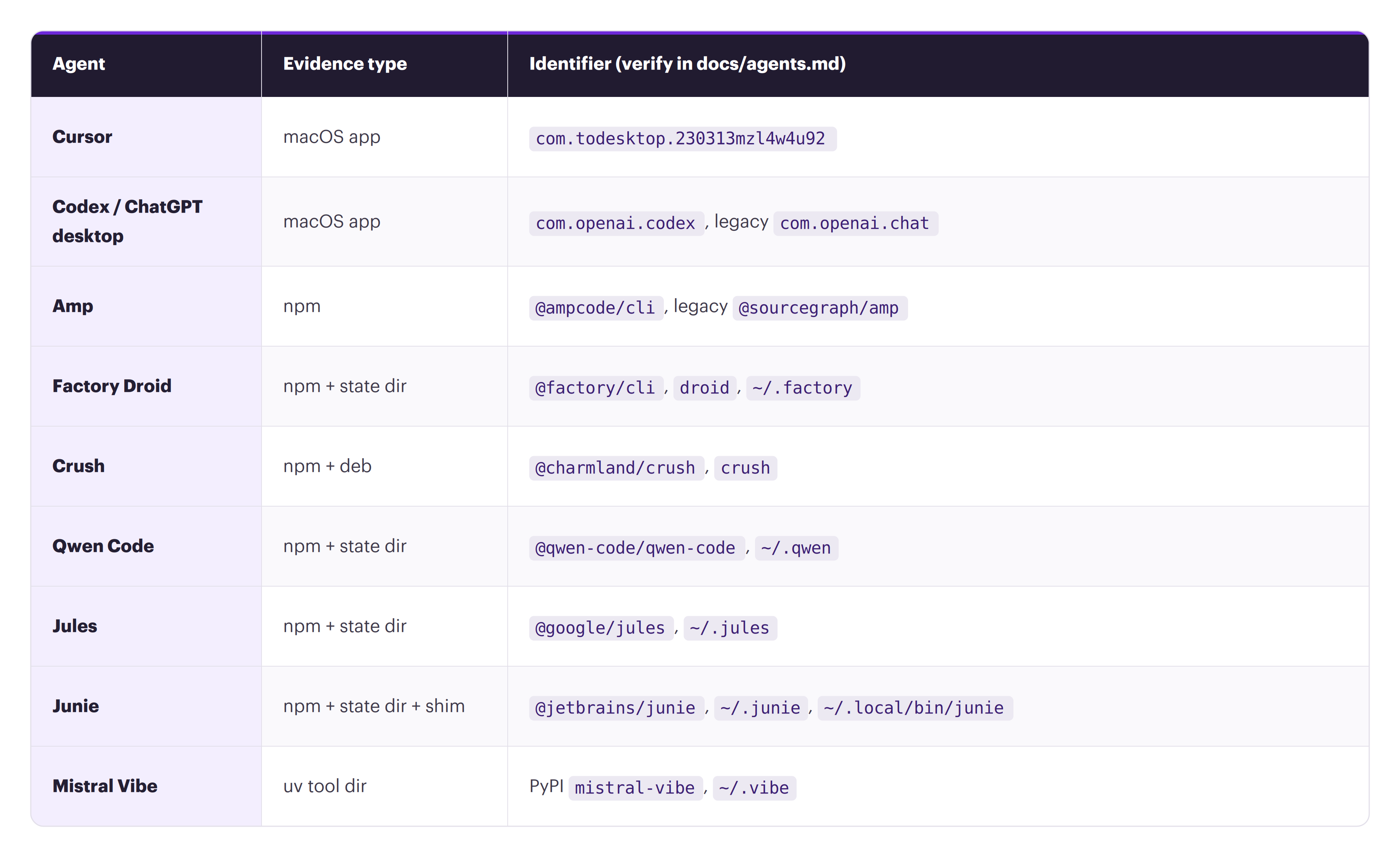
As of October 29, 2026, the spec tracks 49 agents and 140 identifiers. One review comment noted CI coverage at 119 of 140 when PR #141 opened; the author later cited 140 of 140. Date any count you publish, because this list changes.
Why identifiers change
Identifiers are not stable. ChatGPT desktop's bundle ID changed with the Codex rename. npm packages get renamed or re-scoped (Amp moved from @sourcegraph/amp to @ampcode/cli). A detection list that worked six months ago will miss newer releases, which is why the queries above include legacy names alongside current ones.
Why naive matching fails. The unscoped npm names amp, crush, jules, and qwen-code are unrelated packages in the public registry. Matching on them will produce false positives. Prefer the scoped name (@charmland/crush) and corroborate with a state directory or a second signal before you flag a machine.
How do I run these queries across every laptop?
Fleet policies and scheduled queries
Fleet runs osquery across your fleet and reports results centrally. The ai-detection-spec ships osquery/dist/fleet-policies.yml, so you can import the agent-detection queries as policies and scheduled queries rather than writing them by hand.
osqueryd packs (ai-detection-spec.conf)
If you run osqueryd directly, load the queries as a pack (ai-detection-spec.conf) and set a schedule. Both paths run the same catalog; the difference is who collects the results.
What do Claude Code and Cursor admin analytics show, and where do they stop?
Both vendors offer native analytics, and both are worth using. They also have a hard limit.
Claude Code's analytics dashboard is available for Team and Enterprise at claude.ai/analytics/claude-code; API customers use platform.claude.com/claude-code, and a Claude Code Analytics API provides per-user metrics programmatically.
Cursor's Usage Analytics are available for Team and Enterprise, client version 1.5 or higher. Team admins see data for all team users, and Enterprise adds an Admin API, an Analytics API, and an AI Code Tracking API, all limited to team seats.
These dashboards show sanctioned seats in your own organization. They do not show a developer using a personal Claude or Cursor account, an unsanctioned tool you never bought, or an agent running under someone's individual login. osquery sees the install on the machine regardless of which account it belongs to, which is exactly the gap native analytics leave open.
How do I get osquery findings into my SIEM?
osquery results are only useful if they reach the team that acts on them. Route them into your SIEM alongside the rest of your endpoint telemetry so a new coding agent on a sensitive machine becomes a reviewable event rather than a row in a table nobody reads. The same discipline of sending agent signals to a centralized, well-known destination is what makes agent discovery work at scale.
Deckard tie-in
The identifiers in this post come from ai-detection-spec, where each one is read off a real install in CI. Deckard runs the same catalog against endpoint inventory from Jamf Pro, Compute Engine, EC2, or your own machine, and sends one arthur.discovery.agent event per agent to Splunk, Elastic, or a webhook.
FAQ
Can osquery detect Claude Code? Yes, through package and state-directory evidence. Verify the current identifiers against ai-detection-spec docs/agents.md.
Does osquery see prompts or code sent to AI tools? No. It reports installed and running software and files, not the content of prompts or network requests.
Which osquery version do I need? vscode_extensions requires osquery 5.11.0 or later. JetBrains plugin detection requires 5.18 or later (per arthur-engine PR #2436; verify).
Can I run these queries in Fleet? Yes. The spec ships osquery/dist/fleet-policies.yml.
Get the catalog and ship detections
The verified identifier catalog and the Fleet policies live in ai-detection-spec, and Deckard turns them into SIEM events. Start at github.com/arthur-ai/deckard, or book a demo to see agent discovery across endpoints and cloud environments in one place.
SHARE


