How to Find AI Tools on Macs Managed by Jamf Pro
Most Mac admins already own the system that can answer "which AI tools are on our fleet." It is Jamf Pro. The gap is that standard application inventory sees app bundles, and a large share of AI coding agents install as command-line tools that never show up as bundles. This guide covers both paths: the app-bundle path through extension attributes, Smart Groups, and the API, and the CLI blind spot that app inventory alone will miss.
A scope note before the queries: Jamf reports installed and running software at inventory submission. It does not see prompts, generated code, or network content.
How do I find AI tools installed on Macs managed by Jamf?
Combine application inventory with an extension attribute keyed on known AI bundle IDs, then surface the results through a Smart Computer Group or the Jamf Pro API. Application inventory catches desktop apps that install as bundles, and the extension attribute catches the ones you want to track by exact identifier.
For the agents that install through npm or Homebrew, neither method is enough on its own, which is the blind spot the last section covers.
What does Jamf Pro application inventory show, and what does it miss?
Jamf Pro application inventory lists app bundles in /Applications with name, version, and path. For desktop AI apps that ship as a normal .app, that is often all you need to confirm presence and version across the fleet.
What it misses: AI coding agents installed as CLI tools through npm or Homebrew are not app bundles, so they never appear in application inventory. A Mac can be running several coding agents from the terminal and show nothing in the app list. The last section of this guide covers how to catch those.
How do I write an extension attribute that detects AI agents?
Use a script-type extension attribute. Whatever text the script prints between <result> and </result> is stored on each computer record in Jamf Pro. The script runs each time a computer submits inventory, so it adds a small amount of time to inventory collection.
#!/bin/bash# Jamf Pro extension attribute: AI apps by bundle ID (verify IDs against ai-detection-spec docs/agents.md)
ids="com.todesktop.230313mzl4w4u92 com.openai.chat com.openai.codex"
found=""
for id in $ids; do
  hit=$(/usr/bin/mdfind "kMDItemCFBundleIdentifier == '$id'" 2>/dev/null | head -n 1)
  [ -n "$hit" ] && found="${found}${id};"
done
echo "<result>${found:-None}</result>"
Verify every bundle ID against the ai-detection-spec catalog (docs/agents.md) before you deploy this, since IDs change (see the table below).
Script caveat: mdfind depends on Spotlight indexing, which can be disabled or incomplete on some machines. A more direct fallback reads the Info.plist of each app bundle:
#!/bin/bash# Fallback: read bundle IDs directly from /Applications, no Spotlight dependency
found=""
for app in /Applications/*.app; do
  id=$(/usr/bin/defaults read "$app/Contents/Info" CFBundleIdentifier 2>/dev/null)
  case "$id" in
    com.todesktop.230313mzl4w4u92|com.openai.chat|com.openai.codex)
      found="${found}${id};" ;;
  esac
done
echo "<result>${found:-None}</result>"
How do I build a Smart Computer Group for AI tools?
Create a Smart Computer Group whose criteria match the value your extension attribute reports, so any Mac with a detected AI app lands in the group automatically as inventory updates.
One item to confirm on your own instance: the exact Smart Group criteria names (for example, whether you group on the extension attribute value or on an application bundle ID criterion) vary by Jamf Pro version. Check the current criteria list in learn.jamf.com before you build the group.
How do I pull AI app inventory with the Jamf Pro API?
Use GET /api/v1/computers-inventory. It returns paginated records and requires the Read Computers privilege. The section parameter defaults to GENERAL, and you can pass multiple section parameters in one request to pull more detail.
curl -s -H "Authorization: Bearer $TOKEN" -H "Accept: application/json" \
"https://yourserver.jamfcloud.com/api/v1/computers-inventory?section=GENERAL§ion=APPLICATIONS&page=0&page-size=100"
Two things to note. The Classic API computer inventory endpoints were deprecated as of Jamf Pro 11.15.0 in favor of computers-inventory, so new work should target the current endpoint. And current Jamf API auth guidance favors API clients (client ID and secret) over user-based tokens; confirm the exact token-endpoint wording on developer.jamf.com for your version.
Which bundle IDs identify major AI apps?
Build this table from the ai-detection-spec catalog (docs/agents.md), not from memory, because desktop AI apps rename their bundle identifiers more often than most software. The entries below are the ones to confirm and include once verified against the catalog.
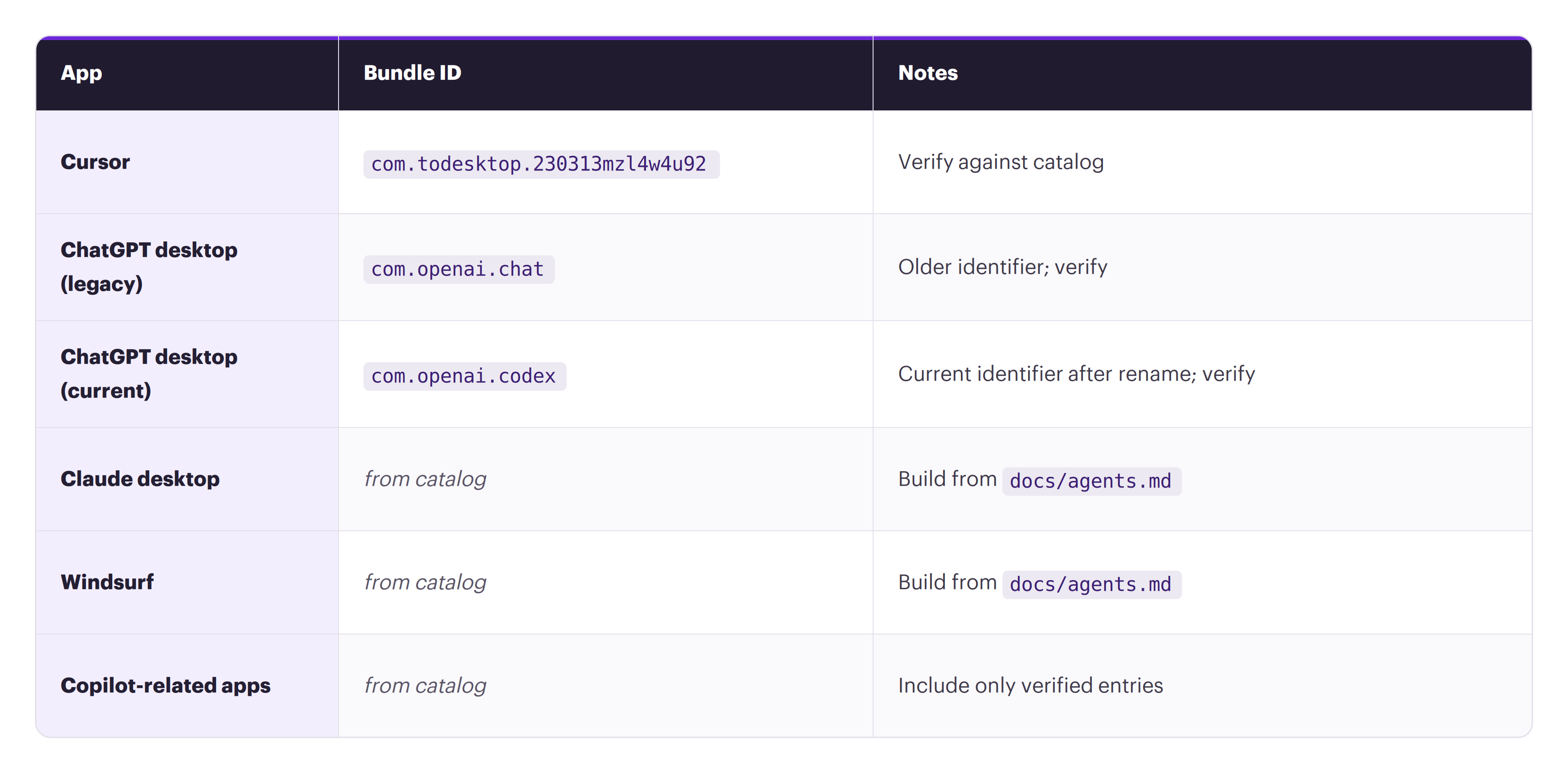
The ChatGPT desktop rename is the clearest reason to pin IDs to the catalog rather than hardcode them once: an identifier that matched last quarter can silently stop matching after an app update.
How do I catch CLI agents installed with npm or Homebrew?
This is the blind spot. Agents installed through npm or Homebrew are not app bundles, so Jamf application inventory will not list them no matter how the extension attribute is written for /Applications.
Examples of coding agents that install this way (from ai-detection-spec PR #141): @ampcode/cli and @qwen-code/qwen-code via npm; droid, qwen-code, and mistral-vibe via Homebrew. A naive name match is risky here, because several unscoped names collide with unrelated packages, so match on the specific package identifiers in the catalog.
To catch these on managed Macs, run osquery against package and state-directory tables (npm_packages, homebrew_packages, and file globs on agent state directories) rather than relying on app inventory. See the companion osquery guide for the tables and queries.
FAQ
Can Jamf Pro detect Claude Code? Not through application inventory alone, because Claude Code installs as a CLI tool rather than an app bundle. Use an extension attribute that checks package and state-directory evidence, or run osquery.
Which Jamf API privilege do I need? Read Computers, for GET /api/v1/computers-inventory.
Does Jamf Protect help here? Not verified in this pass. Confirm its capabilities against Jamf documentation before relying on it for AI tool detection.
How fresh is the data? It updates at inventory submission. Extension attribute results and application inventory reflect the last time each Mac reported in, not real time.
Ship this with Jamf Pro and Deckard
The queries and extension attributes above find AI tools on individual Macs. Turning that into a maintained, fleet-wide inventory you do not hand-assemble is where Deckard, Arthur's open-source discovery tool, comes in.
Point Deckard at Jamf Pro with an API client (client ID and secret). The jamf_pro source reads the endpoint inventory gathered by the Arthur collector, which runs the ai-detection-spec catalog, and filters its lookback on each Mac's general.reportDate so repeat scans stay efficient. A live test read 19 Macs and delivered 50 agents across 12 tools, with each agent landing in Splunk or Elastic as an arthur.discovery.agent event (per PR #2427 and release 2.1.1070; confirm the collector deployment model in the Jamf Pro runbook before standing it up).
Three ways to start:
- Clone the repo and read the config at github.com/arthur-ai/deckard.
- Read the open identifier catalog so you can see exactly what each agent is matched on.
- Book a demo here to see discovery and governance across endpoints, cloud platforms, and your SIEM.
SHARE


